> For the complete documentation index, see [llms.txt](https://docs.personaldiscount.io/llms.txt). Markdown versions of documentation pages are available by appending `.md` to page URLs; this page is available as [Markdown](https://docs.personaldiscount.io/discounteo-for-shopify/integrate-discounteo-with-your-email-service-provider/shopify-notifications/how-to-send-an-order-confirmation-email-with-a-discount-code-in-shopify.md).

# How to send an order confirmation email with a discount code in Shopify?

Are you wondering what to do to make an order confirmation encouraging repeat purchases from your Shopify shop? Here is a guide on how to use Discounteo with Shopify order confirmation.

Firstly open your **Shopify admin panel** > **Apps** > **Discounteo**. Click the **Add automation** button. Select **Shopify** as your **Email Service Provider** and the **campaign type** - **Follow up on purchases**.

<figure><img src="https://3731721370-files.gitbook.io/~/files/v0/b/gitbook-x-prod.appspot.com/o/spaces%2F-LZdVZovthV0SPlgxS6Y%2Fuploads%2FlKRsuhCa8XMOeyHCy1r6%2Fshopify-order-confirmation-personal-discount-code-animated.gif?alt=media&amp;token=9760e824-1e98-4f71-90d4-b729c08adb17" alt="Discounteo follow-up purchase automation setup with an animated preview."><figcaption><p>Add Discounteo follow-up purchase automation</p></figcaption></figure>
In the next step fill out the form of your **automation details**. Here is a useful guide on [how to configure discount](/discounteo-for-shopify/configure-discount.md).

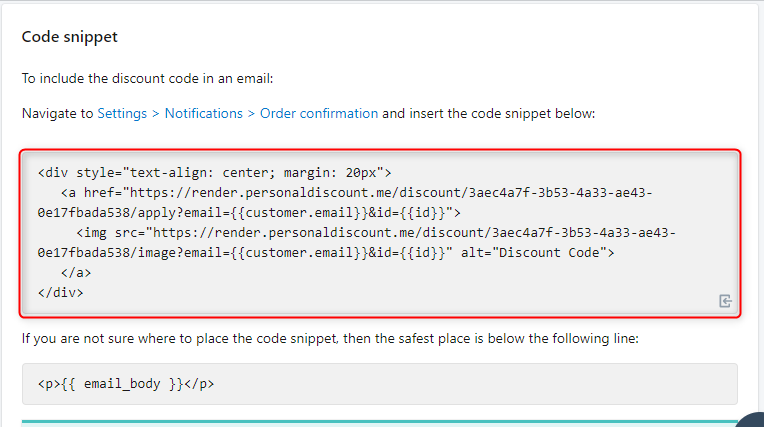
Now **save** your automation and copy the code snippet to your clipboard.

<figure><img src="https://3731721370-files.gitbook.io/~/files/v0/b/gitbook-x-prod.appspot.com/o/spaces%2F-LZdVZovthV0SPlgxS6Y%2Fuploads%2F6IpmGmwAHrYeiMpxORud%2Fpersonal-discount-shopify-encourage-customers-to-buy-more.png?alt=media&amp;token=c394c0f0-f89d-4125-a9dc-12807800c802" alt="Copy code snippet from Discounteo, with the relevant code section highlighted"><figcaption><p>Copy the code snippet from Discounteo</p></figcaption></figure>

Navigate to **Settings** > **Notifications** > **Order confirmation** and insert your code snippet into your confirmation email template. If you are not sure where to place the code snippet, then the safest place is below the following line:

```html
<p>{{ email_body }}</p>
```

You can paste it for example here:

<figure><img src="https://3731721370-files.gitbook.io/~/files/v0/b/gitbook-x-prod.appspot.com/o/spaces%2F-LZdVZovthV0SPlgxS6Y%2Fuploads%2FZCaPnV8d3XBUFoQkEYhe%2Fshopify-confirmation-email-template-personal-discount-code.png?alt=media&amp;token=24a9052d-9e84-4ff7-bb71-0dad0b6ecdc1" alt="Paste the code snippet into order confirmation template annotated"><figcaption><p>Paste the Discounteo code snippet into the Shopify order confirmation template</p></figcaption></figure>

Don't forget to save changes to your template.

<figure><img src="https://3731721370-files.gitbook.io/~/files/v0/b/gitbook-x-prod.appspot.com/o/spaces%2F-LZdVZovthV0SPlgxS6Y%2Fuploads%2FpuOBBD9aPDgQJ1RrokPB%2Fpersonal-discount-code-shopify-confirmation-email-template.png?alt=media&amp;token=cf9ee9be-6f5f-48a0-9ea3-f2fb0f4e0398" alt="Save Shopify order confirmation template annotated"><figcaption><p>Save the Shopify order confirmation template with the Discounteo code snippet</p></figcaption></figure>

When your customers place an order, they will receive a discount code for their next purchases, included in an order confirmation email.

<figure><img src="https://3731721370-files.gitbook.io/~/files/v0/b/gitbook-x-prod.appspot.com/o/spaces%2F-LZdVZovthV0SPlgxS6Y%2Fuploads%2Fs0zjmkY9vLTLfAkXePdR%2Fshopify-confirmation-email-persona-discount-code.png?alt=media&amp;token=3ed1b56b-1241-45a2-9e90-25c851c915d4" alt="Shopify order confirmation email featuring a discount code generated by Discounteo"><figcaption><p>Shopify order confirmation email featuring a discount code generated by Discounteo</p></figcaption></figure>
