> For the complete documentation index, see [llms.txt](https://docs.personaldiscount.io/llms.txt). Markdown versions of documentation pages are available by appending `.md` to page URLs; this page is available as [Markdown](https://docs.personaldiscount.io/discounteo-for-shopify/integrate-discounteo-with-your-email-service-provider/omnisend/recover-abandoned-carts-using-omnisend-with-discounteo.md).

# Recover abandoned carts using Omnisend with Discounteo

Omnisend is a powerful tool that can be easily integrated with Shopify and Discounteo. In this article, you will learn how to use the above to create abandoned carts recovery campaign.

Firstly, navigate to your **Shopify dashboard** ➜ **Apps** ➜ **Discounteo** and hit **Add automation.** Then, select **Omnisend** as your Email Service Provider and **Recover abandoned carts** as the campaign type.

<figure><img src="https://3731721370-files.gitbook.io/~/files/v0/b/gitbook-x-prod.appspot.com/o/spaces%2F-LZdVZovthV0SPlgxS6Y%2Fuploads%2F2XDaEoDd1mH4gc0SyFlC%2Fomnisend-shopify-personal-discount-code-recover-abandoned-carts-campaign.gif?alt=media&amp;token=78ea4d12-cafc-4a40-8c3b-71c620672c8c" alt="Create a recover abandoned carts campaign for Omnisend"><figcaption><p>Create an abandoned cart recovery campaign for Omnisend</p></figcaption></figure>

You will be redirected to a form, where you can set up details of your automation such as a discount value, usage limit, or expiration date. If you would like to learn more about the discount settings provided by our app, please look at the article on [how to configure a discount](/discounteo-for-shopify/configure-discount.md).

Save the automation settings when you finish and copy the code snippet to the clipboard.

<figure><img src="https://3731721370-files.gitbook.io/~/files/v0/b/gitbook-x-prod.appspot.com/o/spaces%2F-LZdVZovthV0SPlgxS6Y%2Fuploads%2FNzkgfYyqLJ4Ecgzml1bM%2Fomnisend-shopify-personal-discount-code-snippet.gif?alt=media&amp;token=9c5a9971-9246-4476-aee4-2601685bfd21" alt="Copy the Discounteo code snippet for the Omnisend abandoned cart campaign"><figcaption><p>Copy the Discounteo code snippet</p></figcaption></figure>

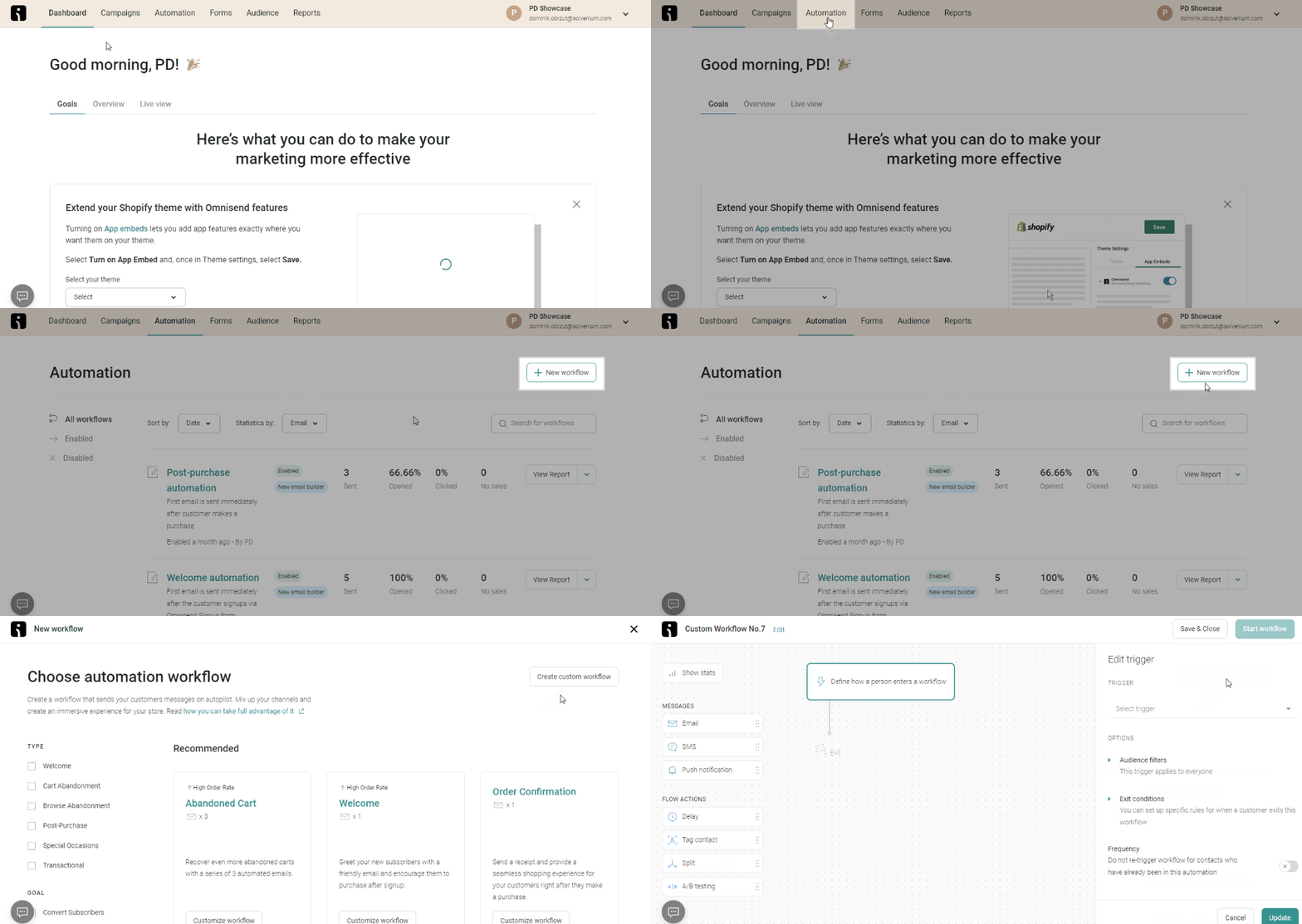
Now switch over to the Omnisend dashboard and click on **Automation** ➜ **New workflow** ➜ **Create custom workflow**. You can also use the built-in abandoned cart automation.

<figure><img src="https://3731721370-files.gitbook.io/~/files/v0/b/gitbook-x-prod.appspot.com/o/spaces%2F-LZdVZovthV0SPlgxS6Y%2Fuploads%2FAk6bq5XG1PINMtKoYFt6%2Fshopify-personal-discount-code-create-new-omnsend-workflow.gif?alt=media&amp;token=bf85b6da-18eb-4a41-8f96-6e9caa3dff7e" alt="Create a new workflow in Omnisend"><figcaption><p>Create a new automation in Omnisend</p></figcaption></figure>

Select a trigger to set who will enter this automation. In this case, it should be **Abandoned Cart**. You can also use additional filters such as Product or Cart Sum if you need them.

<figure><img src="https://3731721370-files.gitbook.io/~/files/v0/b/gitbook-x-prod.appspot.com/o/spaces%2F-LZdVZovthV0SPlgxS6Y%2Fuploads%2FfQeDkGcjBDiYKQW9w4aR%2Fomnisend-set-abandoned-cart-campaign-trigger.gif?alt=media&amp;token=9b9cdd53-c31c-4dd8-936d-0474329f0cc1" alt="Set the &#x22;Abandoned Cart&#x22; automation trigger in Omnisend"><figcaption><p>Set a trigger in the Omnisend abandoned cart workflow</p></figcaption></figure>

Select an action that will be taken when a customer abandons their cart. Drag and drop an **email** element to your workflow. Then you can edit your email template content.

<figure><img src="https://3731721370-files.gitbook.io/~/files/v0/b/gitbook-x-prod.appspot.com/o/spaces%2F-LZdVZovthV0SPlgxS6Y%2Fuploads%2F7Fe3vOj9Fo0hE57ZKSdv%2Fomnisend-add-email-template-to-recover-abandoned-carts-workflow.gif?alt=media&amp;token=f28fe7dd-81b4-442e-a7f7-787712585106" alt="Add email sending to an Omnisend workflow"><figcaption><p>Add an email to the Omnisend workflow</p></figcaption></figure>

Let's include a discount code in your email template. To do this, drag and drop an HTML element. Delete the default content and paste the code snippet from Discounteo.

<figure><img src="https://3731721370-files.gitbook.io/~/files/v0/b/gitbook-x-prod.appspot.com/o/spaces%2F-LZdVZovthV0SPlgxS6Y%2Fuploads%2FbZubmJ7Q3yoMDszrR68M%2Fomnisend-how-to-include-shopify-discount-code.gif?alt=media&amp;token=665f8edc-5283-4977-99da-5e7c6e970df5" alt="Add a unique discount code to an Omnisend email"><figcaption><p>Insert a discount code into your Omnisend email template</p></figcaption></figure>

Set a proper **delay**. To do this, drag and drop an element with the same name and provide the desired value.&#x20;

<figure><img src="https://3731721370-files.gitbook.io/~/files/v0/b/gitbook-x-prod.appspot.com/o/spaces%2F-LZdVZovthV0SPlgxS6Y%2Fuploads%2FPrzI3KgjuaGbxR5fEQpG%2Fomnisend-set-delay-between-trigger-and-emailing.gif?alt=media&amp;token=60f2eddf-cbb4-4ae9-a9ca-3d127c54db44" alt="Set an email delay in an Omnisend workflow"><figcaption><p>Set an email delay in the Omnisend workflow</p></figcaption></figure>

Now it's time to activate your workflow.

<figure><img src="https://3731721370-files.gitbook.io/~/files/v0/b/gitbook-x-prod.appspot.com/o/spaces%2F-LZdVZovthV0SPlgxS6Y%2Fuploads%2FtRe3NFpVZs6rSQC9NDdo%2Fomnisend-start-worflow.png?alt=media&amp;token=9584fec9-4aba-4ac8-8953-247d0d0025f0" alt="Activate an Omnisend workflow"><figcaption><p>Start the Omnisend workflow</p></figcaption></figure>

From now on your customers who abandon their carts will get a message with a discount code to encourage them to complete their order.&#x20;

<figure><img src="https://3731721370-files.gitbook.io/~/files/v0/b/gitbook-x-prod.appspot.com/o/spaces%2F-LZdVZovthV0SPlgxS6Y%2Fuploads%2FCTNXeQ1cfCoIpBXhw8ZE%2Fomnisend-shopify-personal-discount-code-recover-abandoned-carts-campaign.png?alt=media&amp;token=430ce8f9-501f-4d24-8e1c-4c241a32713a" alt="Shopify abandoned cart recovery message with Omnisend"><figcaption><p>Abandoned cart recovery message</p></figcaption></figure>