> For the complete documentation index, see [llms.txt](https://docs.personaldiscount.io/llms.txt). Markdown versions of documentation pages are available by appending `.md` to page URLs; this page is available as [Markdown](https://docs.personaldiscount.io/discounteo-for-shopify/integrate-discounteo-with-your-email-service-provider/klaviyo/send-a-discount-code-for-new-subscribers-using-klaviyo.md).

# Send a discount code for new subscribers using Klaviyo

Email marketing is a great tool to increase your sales. How do you encourage customers to sign up for your newsletter? This guide shows how to send a discount code for new subscribers using Klaviyo.

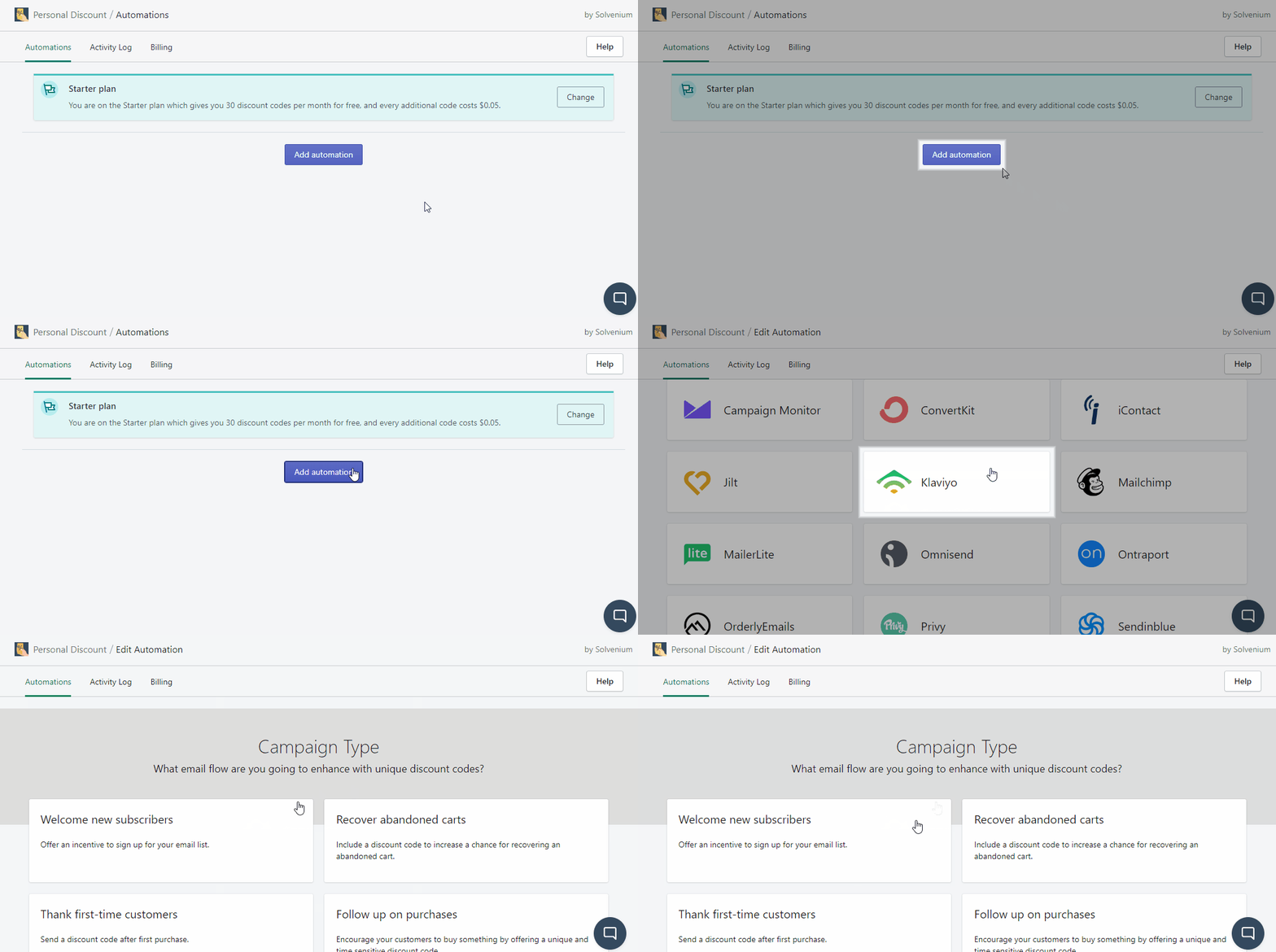
Firstly, visit your **Shopify admin panel** and click **Apps** from the left-hand sidebar. Open **Discounteo** and click **Add automation**. Select **Kaviyo** as your **Email Service Provider** and your **Campaign Type** is **Welcome new subscribers**.

<figure><img src="https://3731721370-files.gitbook.io/~/files/v0/b/gitbook-x-prod.appspot.com/o/spaces%2F-LZdVZovthV0SPlgxS6Y%2Fuploads%2F8tvx8Ch8kU98aW0qchW8%2Fklaviyo-shopify-personal-discount-code-create-welcome-campaign-animated.gif?alt=media&amp;token=89fa5896-eb00-49ca-9c76-80b6fee4fb0e" alt="Add a Discounteo and Klaviyo welcome-new-subscribers automation"><figcaption><p>Add a welcome automation for new subscribers</p></figcaption></figure>

In this step, you can set up details of your automation like a discount value, usage limit, or expiration date. If you would like to learn more, here is a useful article on [how to configure your discount](/discounteo-for-shopify/configure-discount.md).

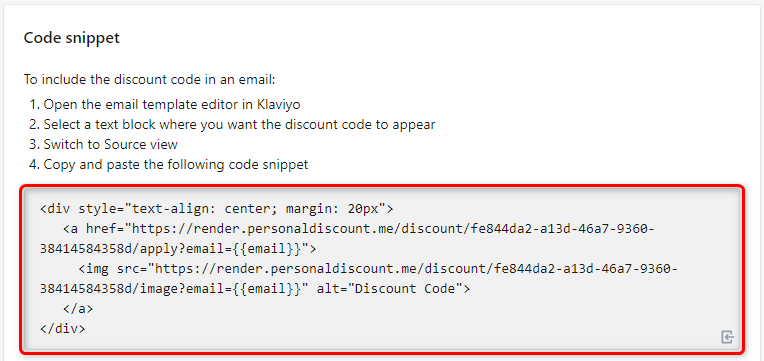
Save the automation when you finish and copy the code snippet to the clipboard.

<figure><img src="https://3731721370-files.gitbook.io/~/files/v0/b/gitbook-x-prod.appspot.com/o/spaces%2F-LZdVZovthV0SPlgxS6Y%2Fuploads%2FML9kIe3BHlG9z6jerCtG%2Fpersonal-discount-code-snippet-shopify-klaviyo-welcome-new-subscribers.png?alt=media&amp;token=f542e161-8194-48b4-9ed4-47578718206f" alt="Copy the Discounteo code snippet"><figcaption><p>Copy the Discounteo code snippet</p></figcaption></figure>

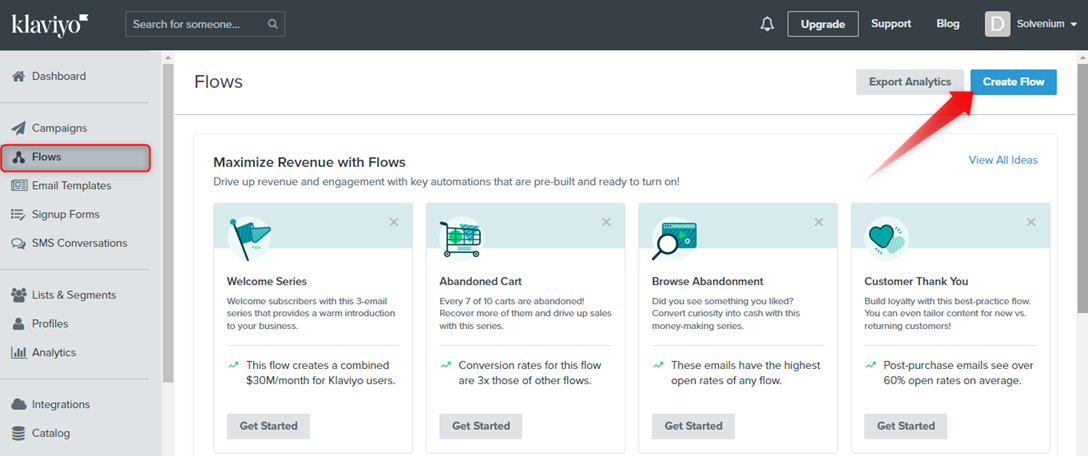
Now switch out to your **Klaviyo admin panel** and open **Flows** from the left-hand sidebar. Next, click **Create flow**.

<figure><img src="https://3731721370-files.gitbook.io/~/files/v0/b/gitbook-x-prod.appspot.com/o/spaces%2F-LZdVZovthV0SPlgxS6Y%2Fuploads%2FS2lkvLUNzQnYHTzq9zkW%2Fpersonal-discount-code-shopify-klaviyo-create-flow.png?alt=media&amp;token=5f95a4b5-9832-4715-a228-217841310aac" alt="How to create a Klaviyo flow"><figcaption><p>Create a Klaviyo flow</p></figcaption></figure>

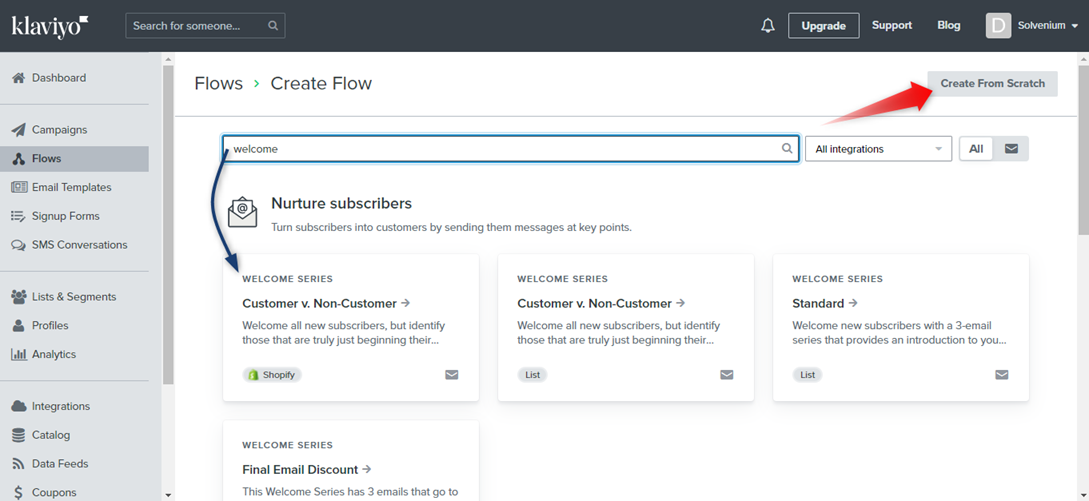
You can use a predefined automation structure or build your own. I will show you how to **Create From Scratch** so click it.

<figure><img src="https://3731721370-files.gitbook.io/~/files/v0/b/gitbook-x-prod.appspot.com/o/spaces%2F-LZdVZovthV0SPlgxS6Y%2Fuploads%2FaNY4aRaTdnycpeOgbgng%2Fpersonal-discount-code-shopif-klaviyo-create-flow-welcome-new-subscribers.png?alt=media&amp;token=61e5d9ec-ce25-48e5-ac3c-39940c6b4ac3" alt="Create a Klaviyo flow from scratch"><figcaption><p>Klaviyo: Create a flow from scratch</p></figcaption></figure>

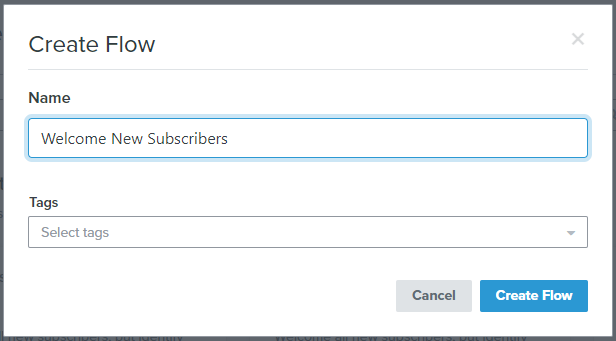
Next, enter the name of your automation.&#x20;

<figure><img src="https://3731721370-files.gitbook.io/~/files/v0/b/gitbook-x-prod.appspot.com/o/spaces%2F-LZdVZovthV0SPlgxS6Y%2Fuploads%2Ffspc7S8VNYf2Wvm8wzmG%2Fpersonal-discount-code-shopify-klaviyo-welcome-new-subscribers-automation-name.png?alt=media&amp;token=96b03a8a-42d8-4f25-a7d9-32a8b39f8670" alt="Enter a name for your Klaviyo flow"><figcaption><p>Enter a name for your Klaviyo flow</p></figcaption></figure>

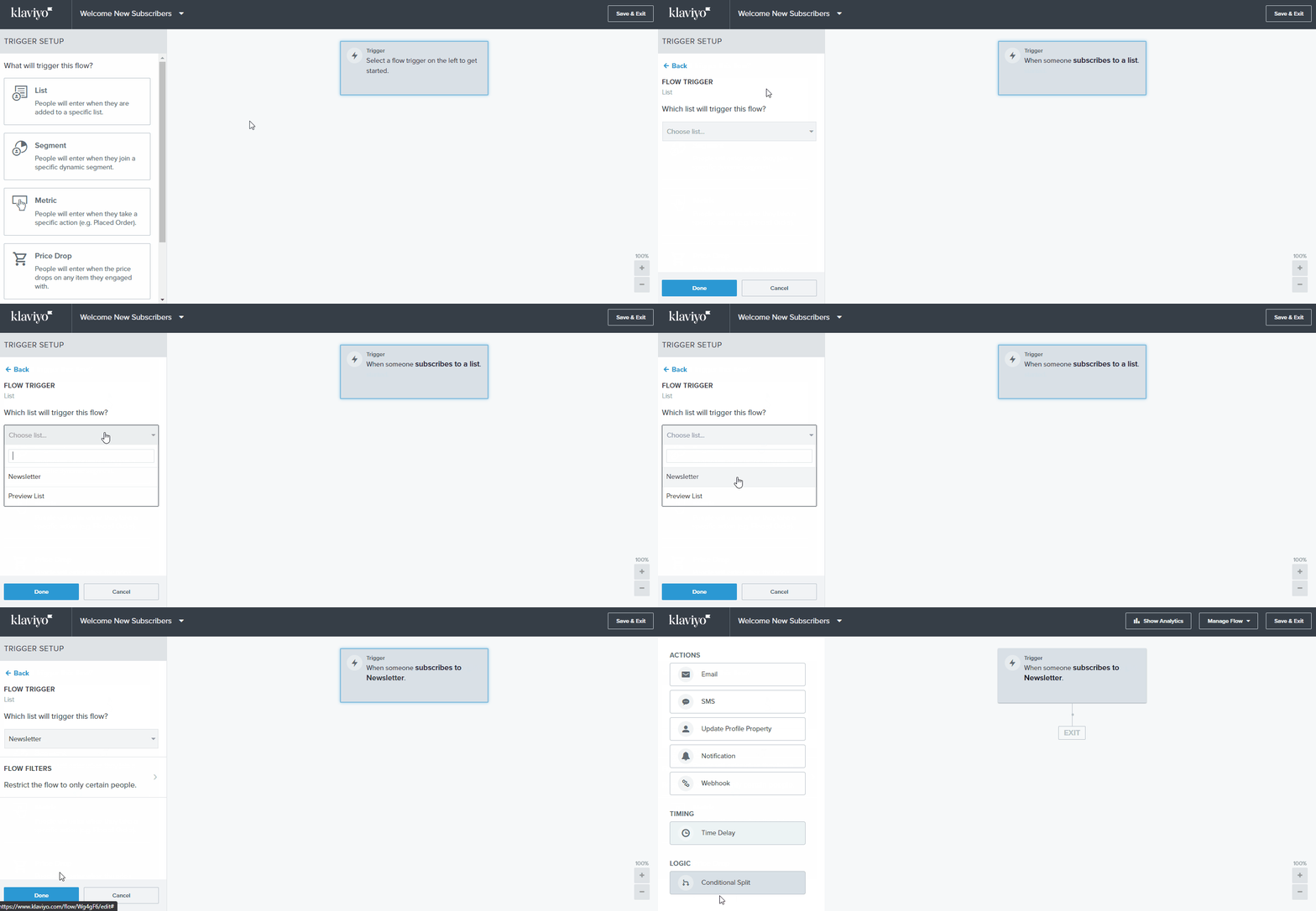
Now set the trigger which will start an action. Click it and then select **List** and **Newsletter** as a list name.

<figure><img src="https://3731721370-files.gitbook.io/~/files/v0/b/gitbook-x-prod.appspot.com/o/spaces%2F-LZdVZovthV0SPlgxS6Y%2Fuploads%2FaI2WP70Nj1m6OGuiv4QF%2Fpersonal-discount-code-shopify-klaviyo-welcome-new-subscribers-automation-set-trigger.gif?alt=media&amp;token=94e63e29-16f1-4737-a54f-c43f4ef75eb2" alt="How to set a Klaviyo flow trigger"><figcaption><p>Set the trigger for your Klaviyo flow</p></figcaption></figure>

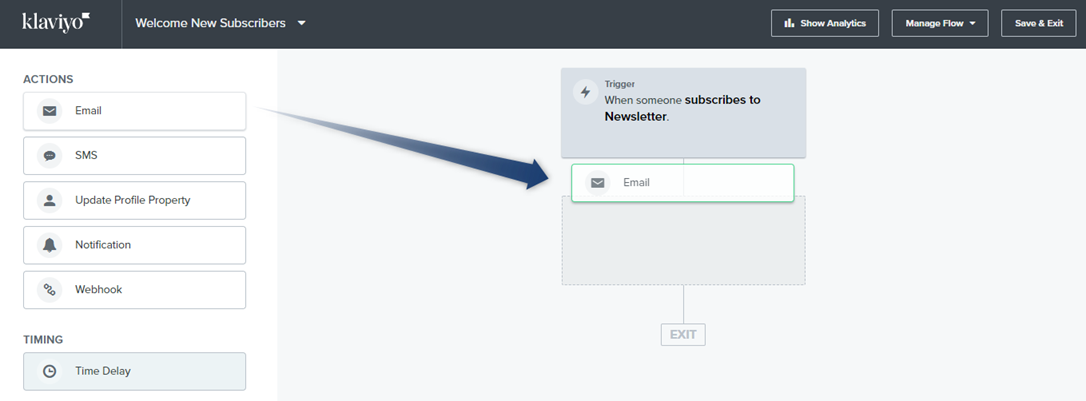
After signing up for the newsletter, your recipient should get a welcome message, so drag and drop the **Email** to your automation structure.

<figure><img src="https://3731721370-files.gitbook.io/~/files/v0/b/gitbook-x-prod.appspot.com/o/spaces%2F-LZdVZovthV0SPlgxS6Y%2Fuploads%2FUDzcsE979pZzWOF0ITW0%2Fpersonal-discount-shopify-code-welcome-new-subscribers-message-automation.png?alt=media&amp;token=5eef77ec-0b49-4dcb-8756-d880eced8e97" alt="How to set an action for a Klaviyo flow"><figcaption><p>Set an action for your Klaviyo flow</p></figcaption></figure>

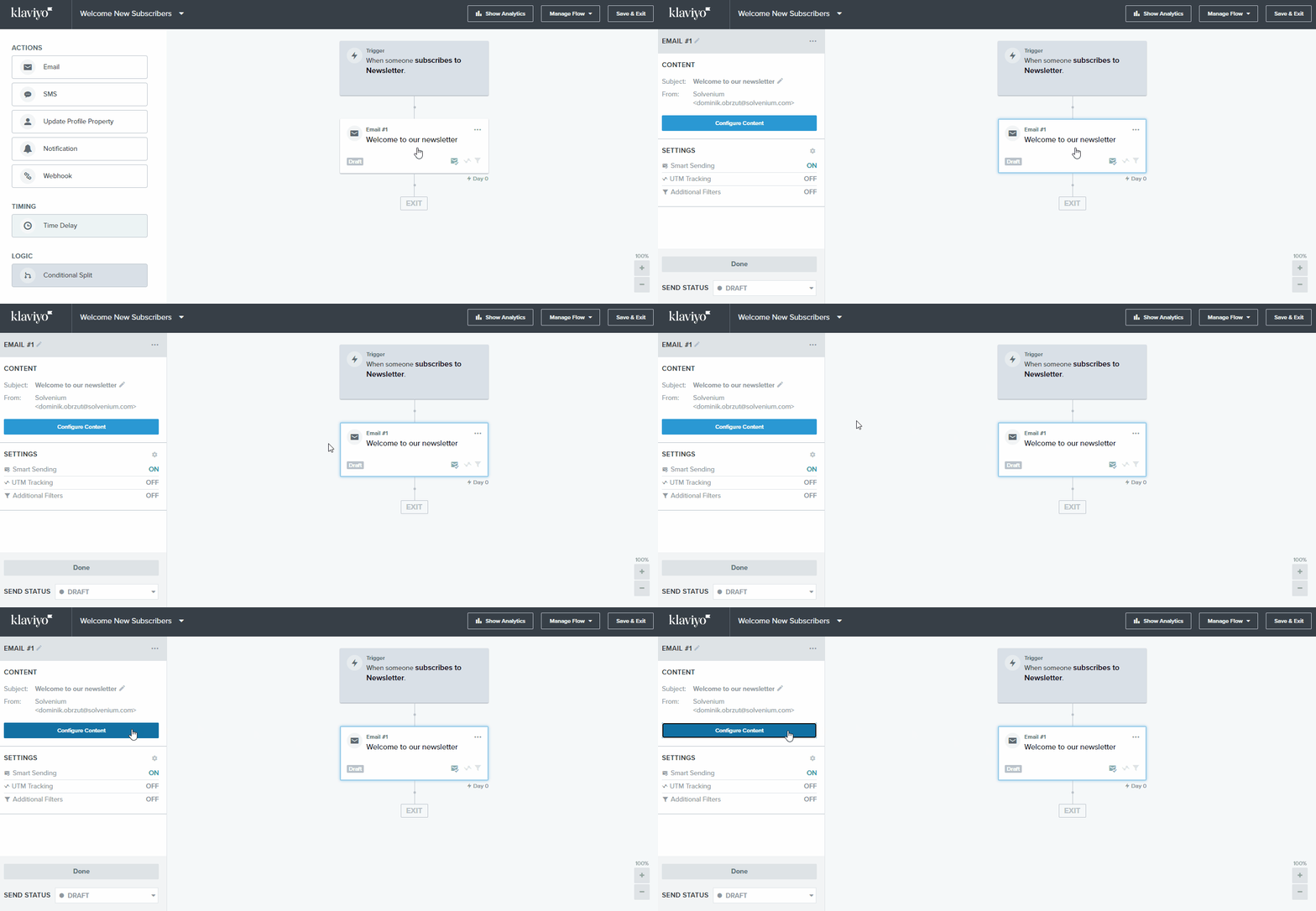
In the next step design your welcome message.

<figure><img src="https://3731721370-files.gitbook.io/~/files/v0/b/gitbook-x-prod.appspot.com/o/spaces%2F-LZdVZovthV0SPlgxS6Y%2Fuploads%2F6CKP0Y84WmCvAQ5DEUyj%2Fpersonal-discount-code-shopify-klaviyo-welcome-new-subscribers-automation-edit-message.gif?alt=media&amp;token=bef83453-2116-4786-b606-057dbf997410" alt="How to design a Klaviyo welcome message"><figcaption><p>Design your Klaviyo welcome message</p></figcaption></figure>

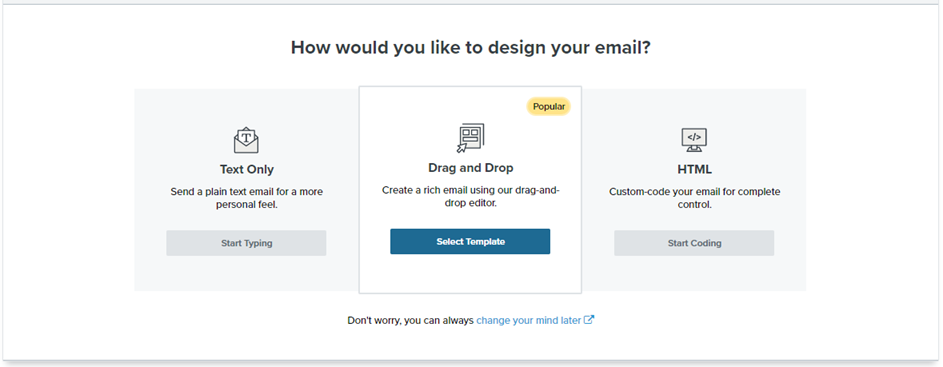
Choose the way how to design your email.

<figure><img src="https://3731721370-files.gitbook.io/~/files/v0/b/gitbook-x-prod.appspot.com/o/spaces%2F-LZdVZovthV0SPlgxS6Y%2Fuploads%2Fc57cFufBFcyAb0ArrEaG%2Fklaviyo-shopify-discount-code-new-subscribers-design-email-message.png?alt=media&amp;token=a93633e9-c037-4619-a08b-bf3992657a2d" alt="Ways to design an email in Klaviyo"><figcaption><p>Ways to design an email in Klaviyo</p></figcaption></figure>

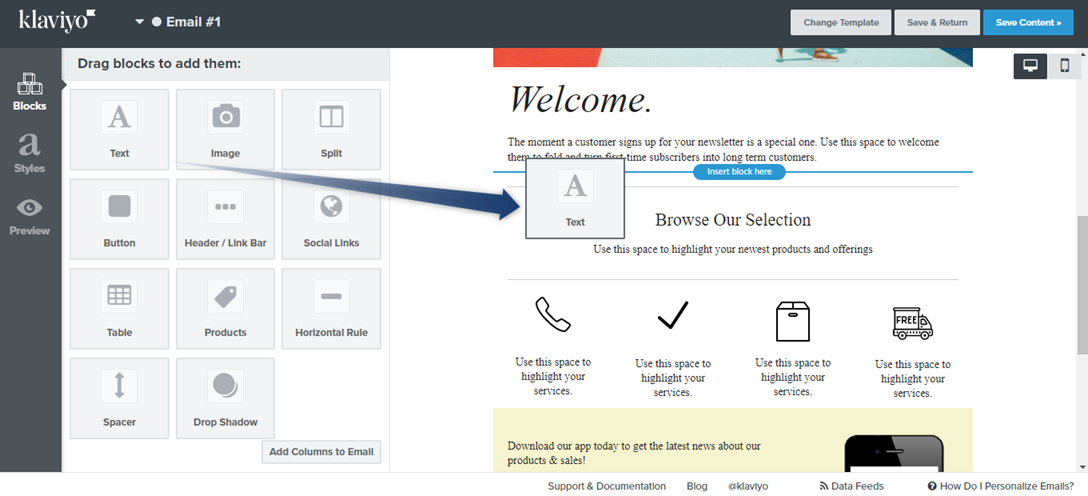
Drag and drop a text element to the email content.&#x20;

<figure><img src="https://3731721370-files.gitbook.io/~/files/v0/b/gitbook-x-prod.appspot.com/o/spaces%2F-LZdVZovthV0SPlgxS6Y%2Fuploads%2FSRAK296FjX07epRQaSJr%2Fklaviyo-personal-discount-code-design-email-text-element.png?alt=media&amp;token=29e87c47-e375-45c7-8f24-5e84a3e4ef89" alt="Insert a text element into a Klaviyo email design"><figcaption><p>Insert a text element into your Klaviyo email design</p></figcaption></figure>

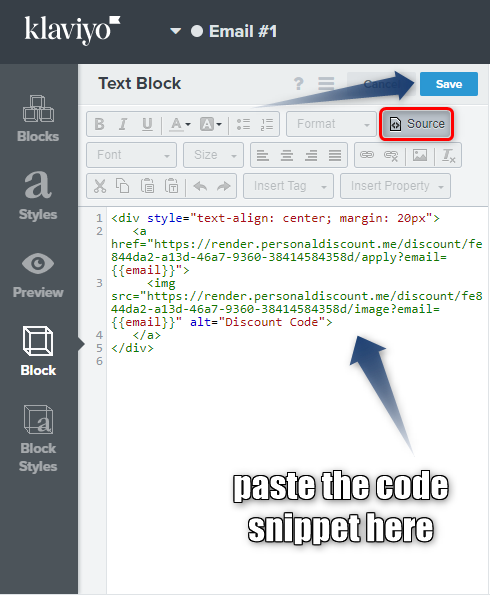
Now edit this text element. Switch view to the **Source** and paste the code snippet from Discounteo.

<figure><img src="https://3731721370-files.gitbook.io/~/files/v0/b/gitbook-x-prod.appspot.com/o/spaces%2F-LZdVZovthV0SPlgxS6Y%2Fuploads%2FGCAosYcXYuhmWd4VgZps%2Fpersonal-discount-code-klaviyo-discount-code-snippet.png?alt=media&amp;token=2960ef35-f600-4eaf-b650-af822b1f9cb1" alt="How to edit the code source in a Klaviyo text element"><figcaption><p>Edit the source code in a Klaviyo text element</p></figcaption></figure>

Don't forget to save your content.

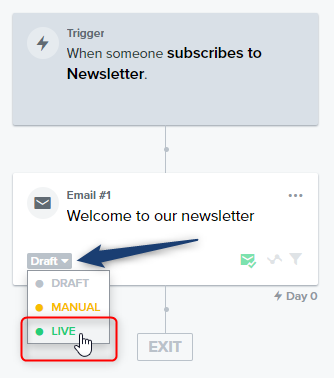
And finally, you need to start your automation. Change the status from Draft to Live.

<figure><img src="https://3731721370-files.gitbook.io/~/files/v0/b/gitbook-x-prod.appspot.com/o/spaces%2F-LZdVZovthV0SPlgxS6Y%2Fuploads%2FJbJ3FeIpSw91JMYH5ar1%2Fpersonal-discount-code-klaviyo-welcome-new-subscribers-start-automation.png?alt=media&amp;token=ba070385-65fe-452a-8207-0f7b6df95f0d" alt="Activate a Klaviyo automation"><figcaption><p>Activate the Klaviyo automation</p></figcaption></figure>

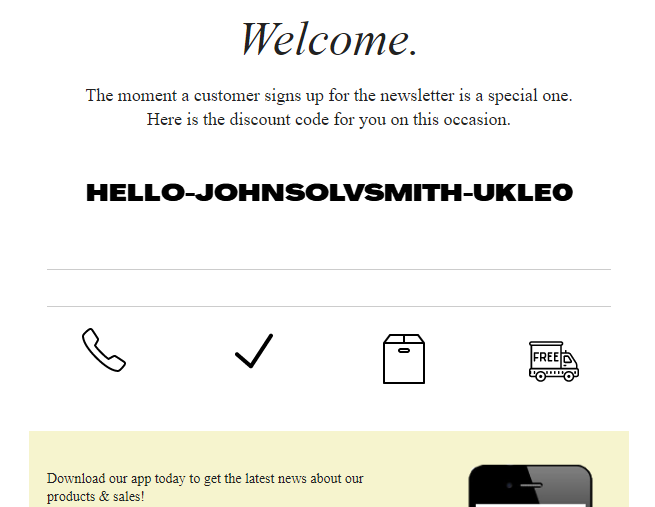
Save your automation by clicking the button at the top right. Now, when someone signs up for your newsletter, will get the discount code.

<figure><img src="https://3731721370-files.gitbook.io/~/files/v0/b/gitbook-x-prod.appspot.com/o/spaces%2F-LZdVZovthV0SPlgxS6Y%2Fuploads%2FpiY0PmozENJ9qkXsuFaz%2Fklaviyo-welcome-new-subscriber-shopify-personaol-discount-code.png?alt=media&amp;token=971676c9-d5c5-456d-8c99-47801e5778ed" alt="Example Klaviyo welcome message with a Discounteo discount code"><figcaption><p>Example Klaviyo welcome email with a Discounteo discount code</p></figcaption></figure>