> For the complete documentation index, see [llms.txt](https://docs.personaldiscount.io/llms.txt). Markdown versions of documentation pages are available by appending `.md` to page URLs; this page is available as [Markdown](https://docs.personaldiscount.io/discounteo-for-shopify/integrate-discounteo-with-your-email-service-provider/klaviyo/how-to-create-a-post-purchase-campaign-to-increase-customers-loyalty-using-klaviyo.md).

# How to create a post-purchase campaign to increase customers' loyalty using Klaviyo

Do you want to increase your customers' loyalty to your Shopify store? The best solution is to create an email campaign with discount codes for their next purchases.

In this guide, we will examine how to do this with Discounteo and Klaviyo.

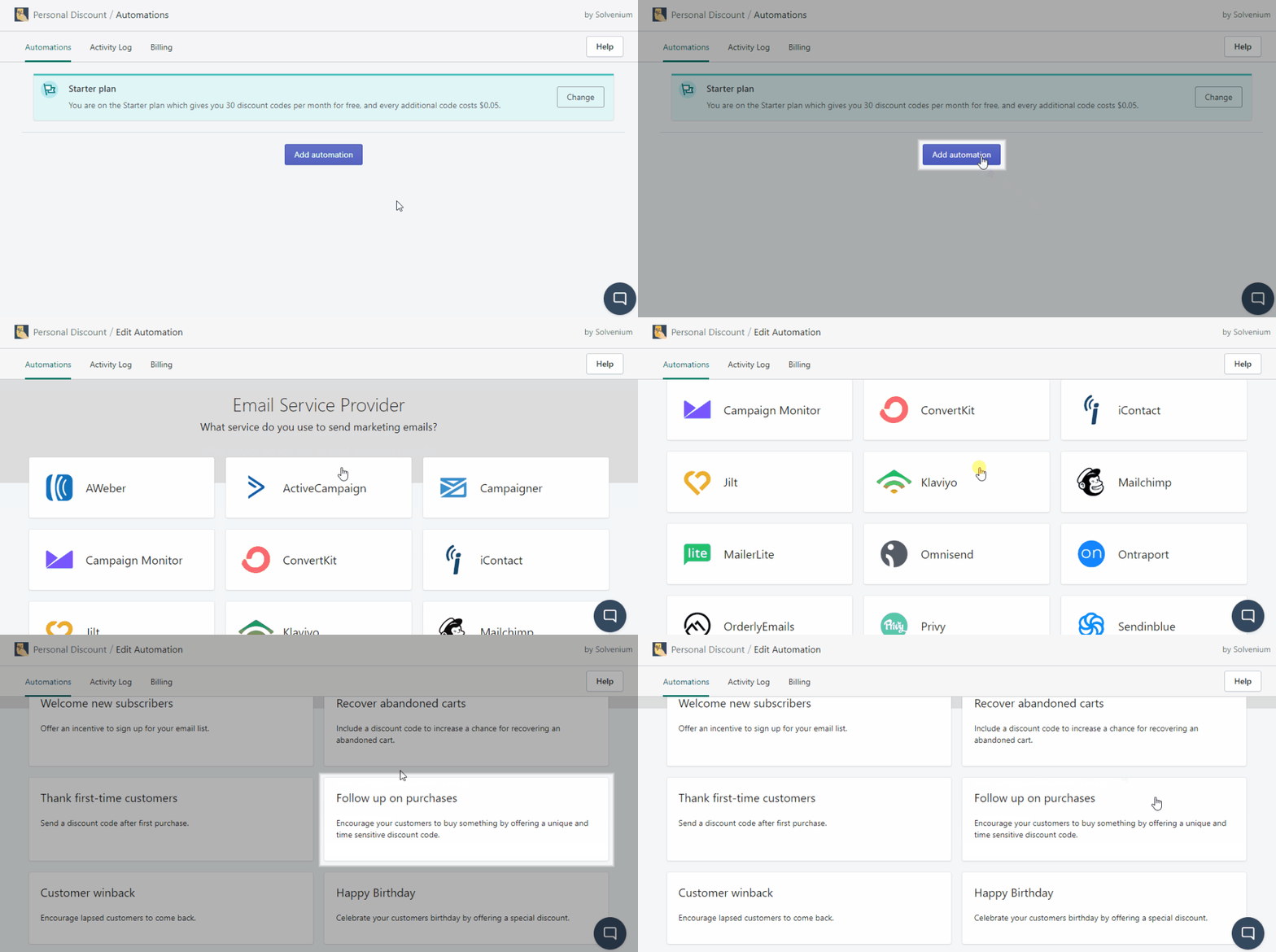
Let's start with creating a new automation with our app. Open your **Shopify dashboard** > **Apps** > **Discounteo**. Then pick **Klaviyo** as your **Email Service Provider,** and the **Campaign type** is **Follow up on purchases**.

<figure><img src="https://3731721370-files.gitbook.io/~/files/v0/b/gitbook-x-prod.appspot.com/o/spaces%2F-LZdVZovthV0SPlgxS6Y%2Fuploads%2FtZSpaQiSoowrSeqTqlvM%2Fklaviyo-shopify-personal-discount-code-create-post-purchase-campaign-animated.gif?alt=media&amp;token=ff227a79-37da-44d3-84cd-ba1cd009849a" alt="Create a post-purchase Discounteo automation with Klaviyo"><figcaption><p>Create a post-purchase Discounteo automation with Klaviyo</p></figcaption></figure>

Next, set details of your automation. Here is a useful guide on [how to configure a discount](/discounteo-for-shopify/configure-discount.md) which describes parameters that you can control.

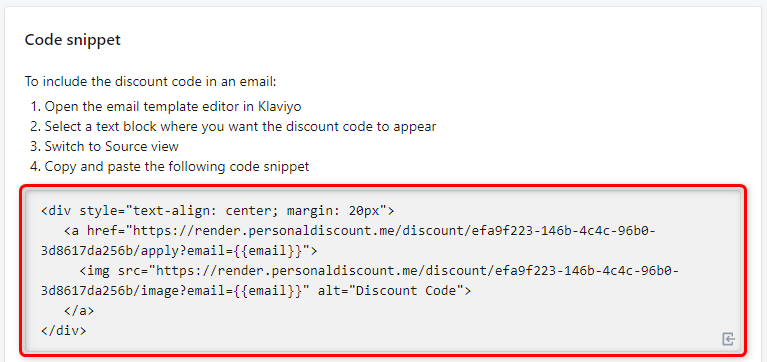
If you have set everything up, save your automation and copy the code snippet to the clipboard.

<figure><img src="https://3731721370-files.gitbook.io/~/files/v0/b/gitbook-x-prod.appspot.com/o/spaces%2F-LZdVZovthV0SPlgxS6Y%2Fuploads%2FTzTRrRJN5APNxs33eoAq%2Fklaviyo-personal-discount-code-snippet-shopify-follow-upon-purchases-campaign.png?alt=media&amp;token=543b2183-0e81-4356-ad98-0e8d0aeeb48b" alt="Copy the code snippet from Discounteo"><figcaption><p>Copy the code snippet from Discounteo</p></figcaption></figure>

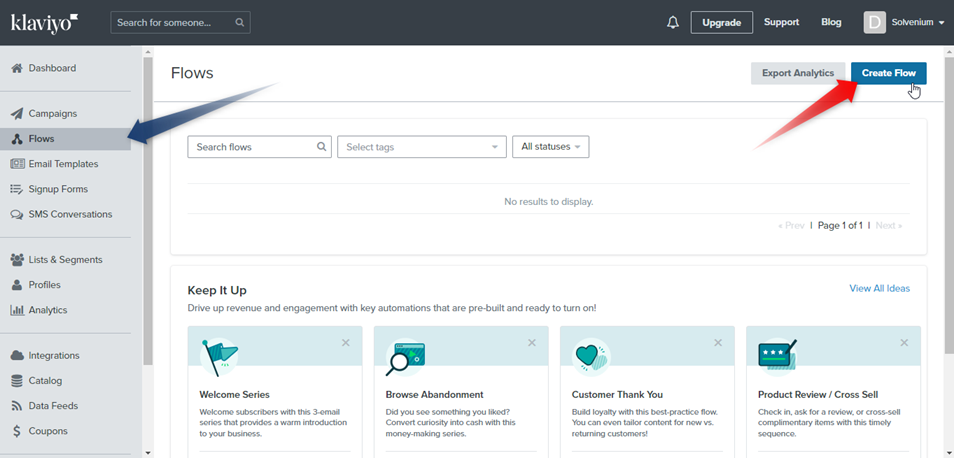
In the next step, switch over to the **Klaviyo dashboard** > **Flows** > **Create Flow**.

<figure><img src="https://3731721370-files.gitbook.io/~/files/v0/b/gitbook-x-prod.appspot.com/o/spaces%2F-LZdVZovthV0SPlgxS6Y%2Fuploads%2FyFIpHiTfTKinfIkart0g%2Fklaviyo-create-flow-shopify-personal-discount-code-follow-up-on-purchases.png?alt=media&amp;token=4858b074-775e-42e8-ac9e-1b6bdbcd0258" alt="Create a Klaviyo flow"><figcaption><p>Create a Klaviyo flow</p></figcaption></figure>

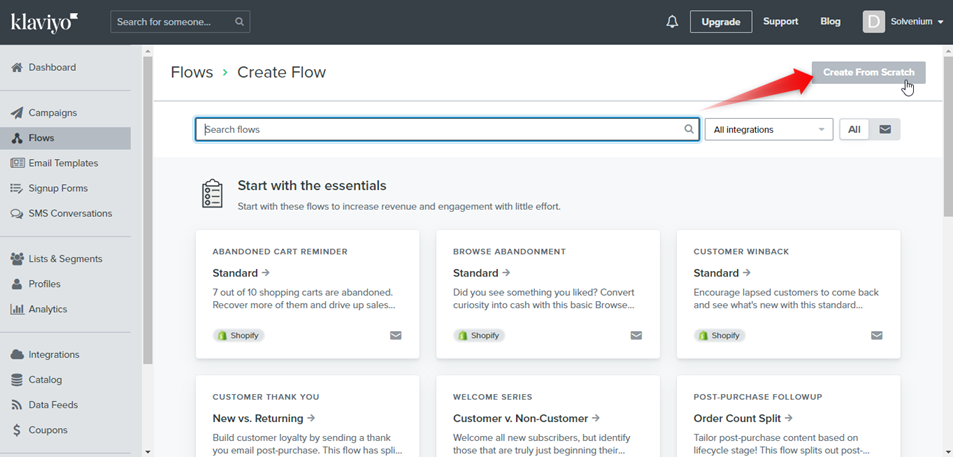
We will build our automation from scratch.

<figure><img src="https://3731721370-files.gitbook.io/~/files/v0/b/gitbook-x-prod.appspot.com/o/spaces%2F-LZdVZovthV0SPlgxS6Y%2Fuploads%2FHrp34NVf04KiWgtjoQ4f%2Fpersonal-discount-code-shopify-klaviyo-follow-up-on-purchases-campaign-create-fom-scratch.png?alt=media&amp;token=9f384d7e-36c2-48e3-be5e-1fe8104a5385" alt="Build a Klaviyo automation from scratch"><figcaption><p>Build a Klaviyo automation from scratch</p></figcaption></figure>

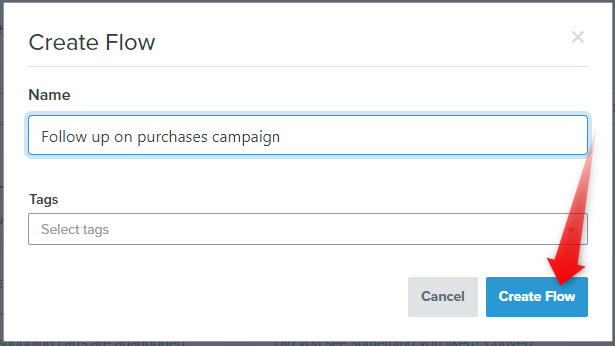
Enter the flow name.

<figure><img src="https://3731721370-files.gitbook.io/~/files/v0/b/gitbook-x-prod.appspot.com/o/spaces%2F-LZdVZovthV0SPlgxS6Y%2Fuploads%2FkEm5yrEIWwPZCmtI9yR7%2Fklaviyo-shopify-create-flow-name-post-purchase-automation.png?alt=media&amp;token=1e255537-9e7e-4658-a84b-b5e4443bb4de" alt="Provide a name for your Klaviyo flow"><figcaption><p>Provide a name for your Klaviyo flow</p></figcaption></figure>

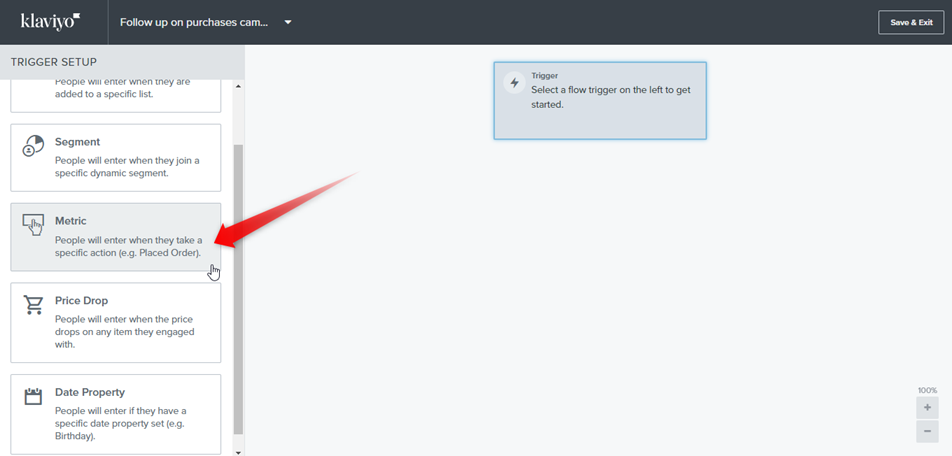
Now we will create our automation structure. Let's start with a trigger. We want to send a message when a customer placed an order, so click **Metric**.

<figure><img src="https://3731721370-files.gitbook.io/~/files/v0/b/gitbook-x-prod.appspot.com/o/spaces%2F-LZdVZovthV0SPlgxS6Y%2Fuploads%2FkPBcoGROE9pjQvSkdfLW%2Fklaviyo-personal-discount-code-shopify-placed-order-trigger.png?alt=media&amp;token=23c598dd-40d0-45f8-b90f-5de9c1e95799" alt="Select a trigger for your Klaviyo flow"><figcaption><p>Select a trigger for your Klaviyo flow</p></figcaption></figure>

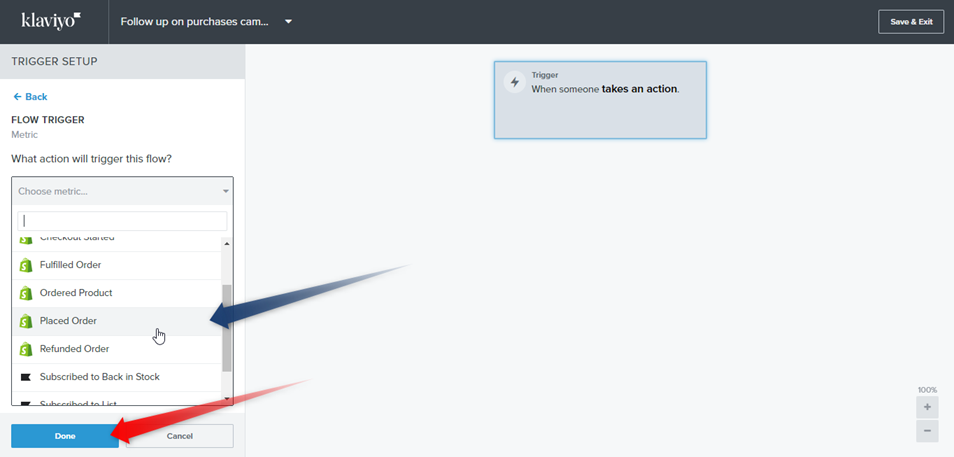
And select **Placed Order** from the dropped-down menu. Then click **Done**. You can also set trigger filters or flow filters to restrict automation to only certain people.

<figure><img src="https://3731721370-files.gitbook.io/~/files/v0/b/gitbook-x-prod.appspot.com/o/spaces%2F-LZdVZovthV0SPlgxS6Y%2Fuploads%2FmeQf5sABS9jbDFnwp9n4%2Fklaviyo-shopify-placed-order-trigger-personal-discount-code-campaign.png?alt=media&amp;token=01161b32-c0bd-4db0-b098-b70573385a1e" alt="Set the &#x22;Placed Order&#x22; trigger in your Klaviyo flow"><figcaption><p>"Place Order" trigger in a Klaviyo flow</p></figcaption></figure>

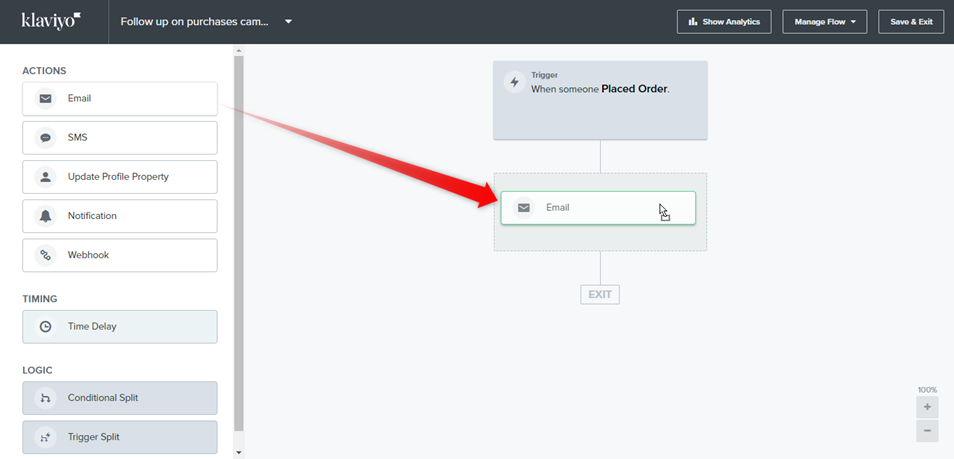
Now drag and drop an action that will be taken after placing an order. We want to send an **email**. You can also set a time delay.

<figure><img src="https://3731721370-files.gitbook.io/~/files/v0/b/gitbook-x-prod.appspot.com/o/spaces%2F-LZdVZovthV0SPlgxS6Y%2Fuploads%2FoqtkaIBGOHNaNafdvT96%2Fklaviyo-folllow-up-on-purchases-campaign-discount-code-email.png?alt=media&amp;token=db6aa4f5-869d-4a2e-9cc7-651cacd18e28" alt="Insert a “Send Email” action into your Klaviyo flow"><figcaption><p>Insert the "Send Email" action into your Klaviyo flow</p></figcaption></figure>

In the next step, design your message with a discount code.

<figure><img src="https://3731721370-files.gitbook.io/~/files/v0/b/gitbook-x-prod.appspot.com/o/spaces%2F-LZdVZovthV0SPlgxS6Y%2Fuploads%2FVlffEkXL2aCqMcB7cBfy%2Fklaviyo-personal-discount-code-shopify-design-email-message.png?alt=media&amp;token=4d47ff1e-0685-4692-9eaf-ff48ada126d5" alt="Edit the email in your Klaviyo flow"><figcaption><p>Edit the email in your Klaviyo flow</p></figcaption></figure>

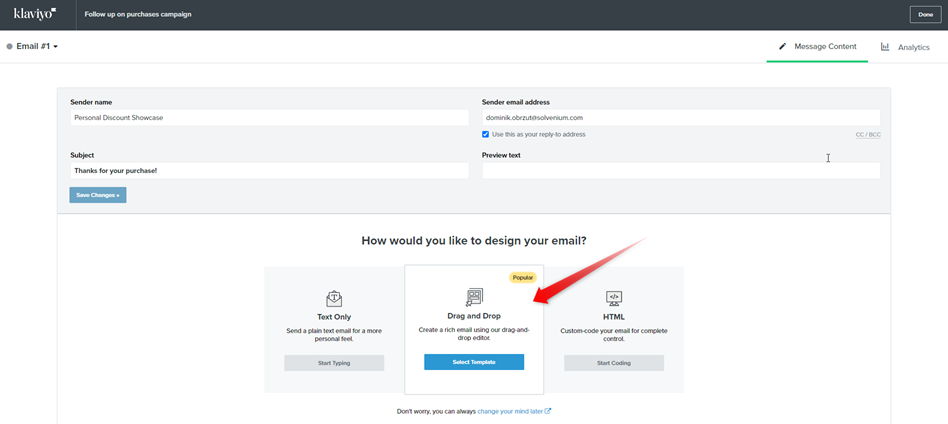
Here you can set the details of your email like the mail sender or subject and select your message designing way.

<figure><img src="https://3731721370-files.gitbook.io/~/files/v0/b/gitbook-x-prod.appspot.com/o/spaces%2F-LZdVZovthV0SPlgxS6Y%2Fuploads%2FOnVamNJpKAAaU44hMNpd%2Fklaviyo-post-purchase-email-with-discount-code.png?alt=media&amp;token=ebeb9dc2-fe06-4c00-92b7-a7f9d653fbb2" alt="Select a way to design the email for your Klaviyo flow"><figcaption><p>Select a way to design an email for your Klaviyo workflow</p></figcaption></figure>

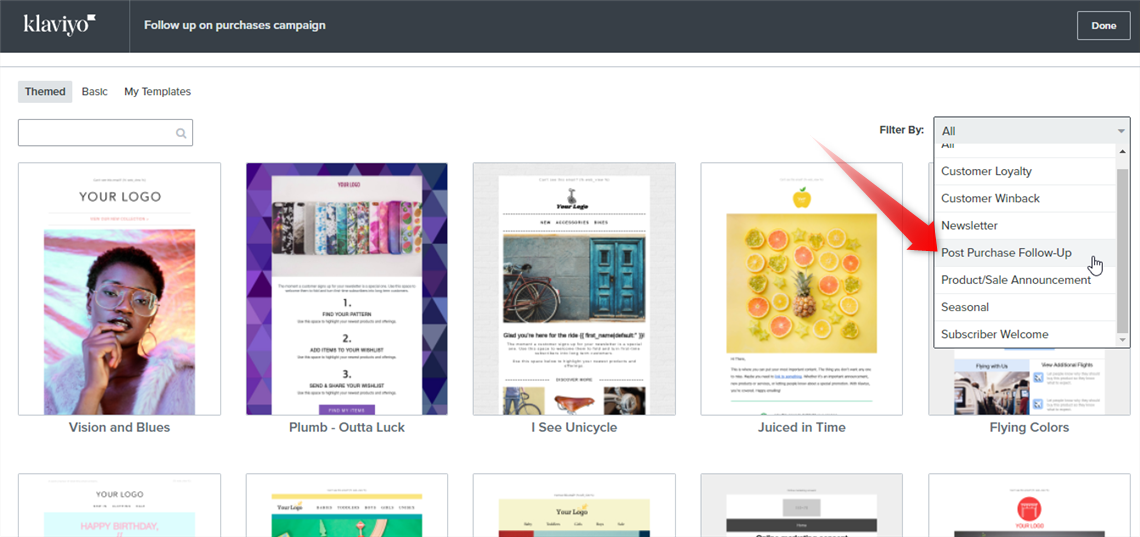
You can choose one of the pre-built templates or create your own.

<figure><img src="https://3731721370-files.gitbook.io/~/files/v0/b/gitbook-x-prod.appspot.com/o/spaces%2F-LZdVZovthV0SPlgxS6Y%2Fuploads%2FL7lbd1aJGRSZ0HLqg4N6%2Femail-template-discount-code-post-purchase-campaign-klaviyo-shopify.png?alt=media&amp;token=198ddbc0-391d-4dfe-ae65-93282d35c4ad" alt="Email templates for Klaviyo automation"><figcaption><p>Email templates for Klaviyo automation</p></figcaption></figure>

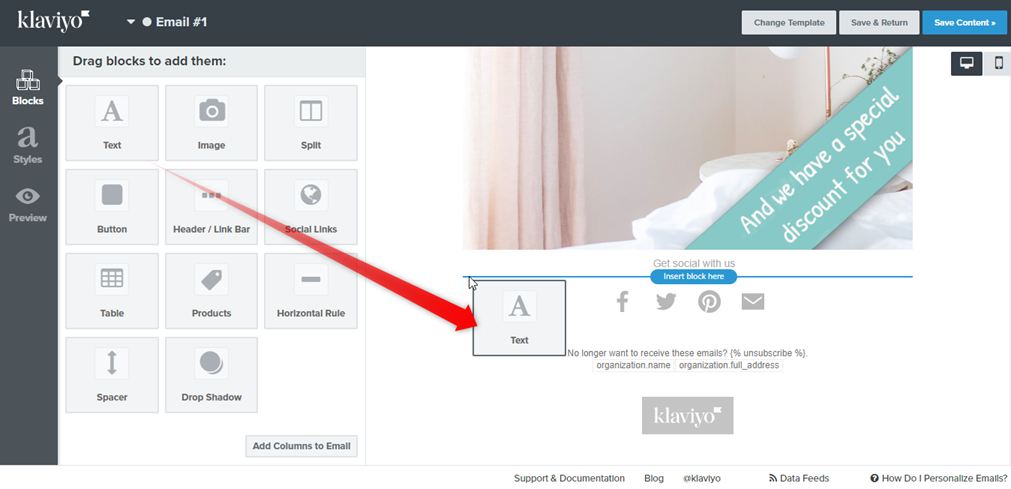
Now drag and drop a text element that will contain a code snippet. You can also use the existing element from your template.

<figure><img src="https://3731721370-files.gitbook.io/~/files/v0/b/gitbook-x-prod.appspot.com/o/spaces%2F-LZdVZovthV0SPlgxS6Y%2Fuploads%2FDlxJSMByZtPn3JwLwx8l%2Fklaviyo-shopify-post-purchase-follow-up-campaign-design-email-text-element.png?alt=media&amp;token=2a4b8797-4aab-4715-8e05-86048ed340f2" alt="Insert a text element into a Klaviyo email template"><figcaption><p>Insert a text element into your Klaviyo email template</p></figcaption></figure>

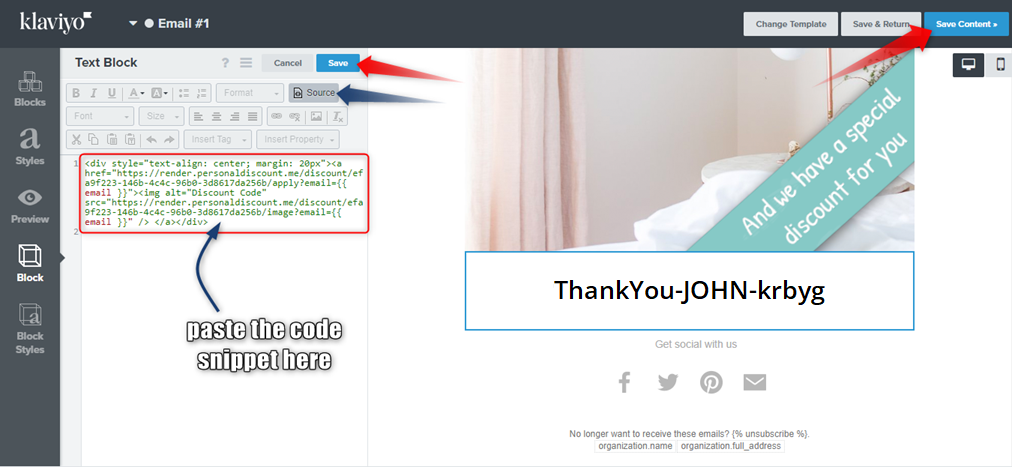
Edit your text element. Switch out to the **Source** view, paste the **code snippet** from Discounteo and **Save** element changes. If your entire template is ready, **Save Content**.

<figure><img src="https://3731721370-files.gitbook.io/~/files/v0/b/gitbook-x-prod.appspot.com/o/spaces%2F-LZdVZovthV0SPlgxS6Y%2Fuploads%2FJhDTgOy1VgFN2RLdwl1f%2Fklaviyo-shopify-paste-code-snippet-email-template.png?alt=media&amp;token=182883ea-86a2-40ab-bf69-2aa216ebad68" alt="Paste the code snippet from Discounteo"><figcaption><p>Paste the code snippet from Discounteo</p></figcaption></figure>

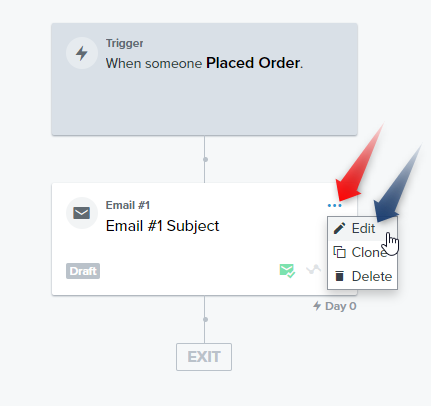
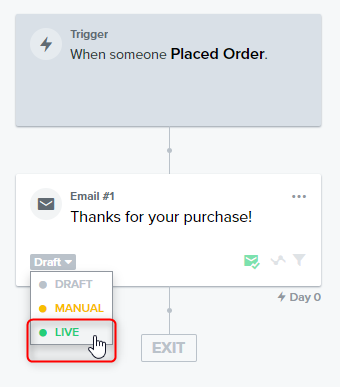
It's high time for activating your automation. Change the email status from **'Draft'** to **'Live'**. Then **Save & Exit.**

<figure><img src="https://3731721370-files.gitbook.io/~/files/v0/b/gitbook-x-prod.appspot.com/o/spaces%2F-LZdVZovthV0SPlgxS6Y%2Fuploads%2FtXA3IBfcVxp4tUI7lq63%2Fklaviyo-shopify-activate-post-purchase-follow-up-campaign.png?alt=media&amp;token=86bcf653-2170-44b9-96bf-a01bf6f098c8" alt="Activate your Klaviyo automation"><figcaption><p>Activate your Klaviyo automation</p></figcaption></figure>

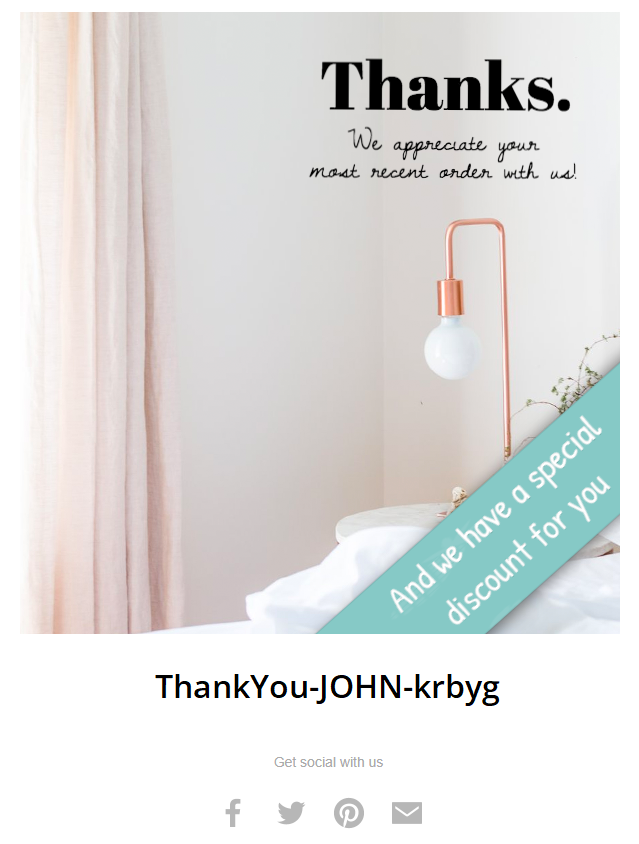
Now your customers will receive a message with a discount code when they place an order.

<figure><img src="https://3731721370-files.gitbook.io/~/files/v0/b/gitbook-x-prod.appspot.com/o/spaces%2F-LZdVZovthV0SPlgxS6Y%2Fuploads%2FxIQdmtqH1gxnvwVephBQ%2Fklaviyo-post-purchase-message-shopify-discount-code.png?alt=media&amp;token=a60cf2f2-de48-48d3-9f50-86d12695c296" alt="Klaviyo email with a Discounteo discount code"><figcaption><p>Klaviyo email with a Discounteo discount code</p></figcaption></figure>