> For the complete documentation index, see [llms.txt](https://docs.personaldiscount.io/llms.txt). Markdown versions of documentation pages are available by appending `.md` to page URLs; this page is available as [Markdown](https://docs.personaldiscount.io/discounteo-for-shopify/integrate-discounteo-with-your-email-service-provider/campaign-monitor/how-to-send-automated-welcome-emails-with-discount-codes-using-campaign-monitor.md).

# How to send automated welcome emails with discount codes using Campaign Monitor

Let's examine how to encourage your Shopify customers to subscribe to your newsletter. We will use the Discounteo app and Campaign Monitor as an email marketing tool.

Start by creating a discount automation. Navigate to your **Shopify dashboard** > **Apps** > **Discounteo**. Then click **Add automation** button, select **Campaign Monitor** as your Email Service Provider, and set the Campaign Type to **Welcome new subscribers**.

<figure><img src="https://3731721370-files.gitbook.io/~/files/v0/b/gitbook-x-prod.appspot.com/o/spaces%2F-LZdVZovthV0SPlgxS6Y%2Fuploads%2FOE3LJBBtuRaXQHaygohU%2Fcampaignmonitor-shopify-personal-discount-code-welcome-new-subscribers.gif?alt=media&amp;token=b5f1436b-5807-4644-aa9e-b6c9f6c36d21" alt="How to add a welcome new subscribers campaign in Discounteo using Campaign Monitor"><figcaption><p>Add a new automation in Discounteo</p></figcaption></figure>

Specify the details of your automation. Take a look at the article on [how to configure a discount](/discounteo-for-shopify/configure-discount.md) if you want to learn more.

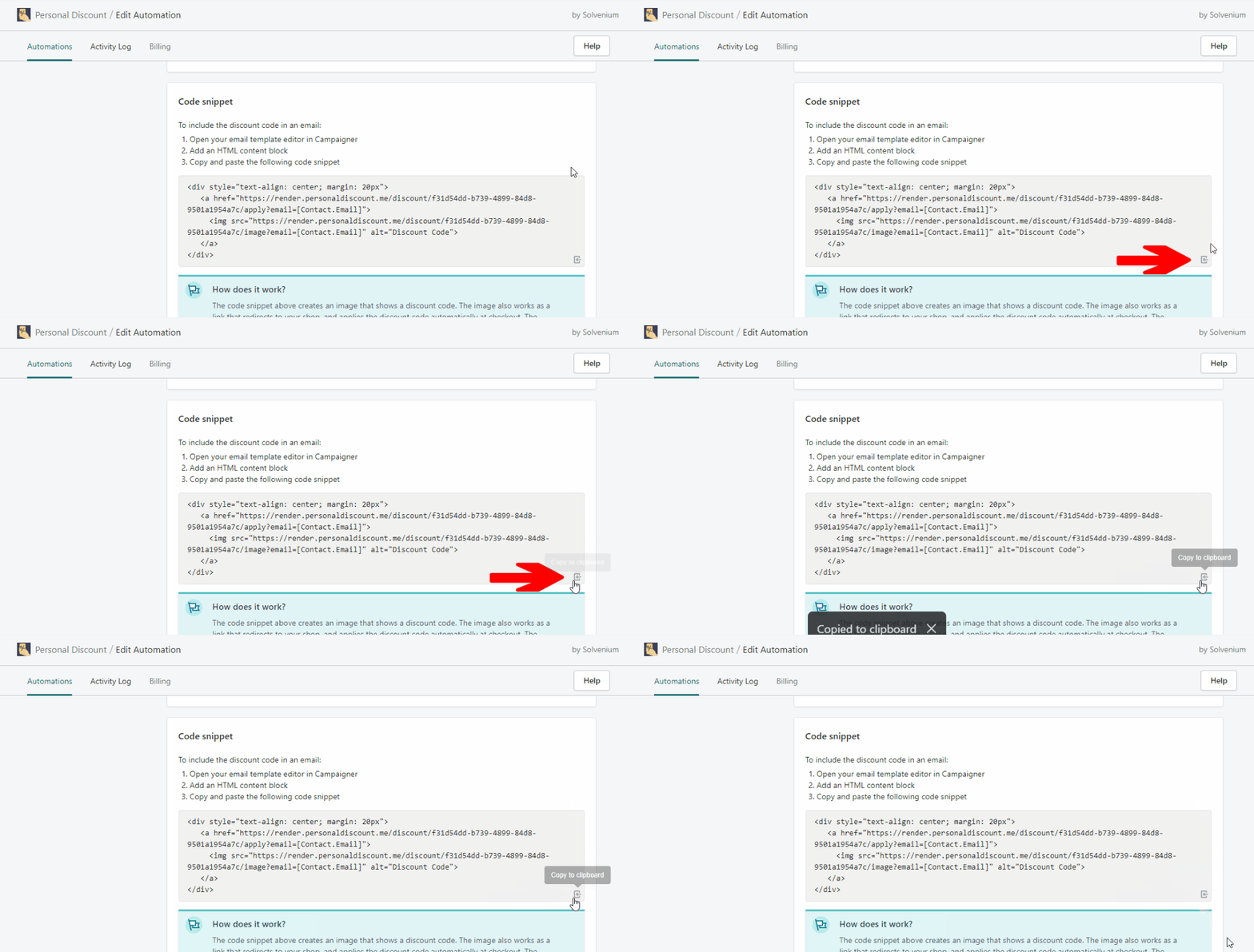
Hit **Save** and copy the code snippet to the clipboard when you set it up.&#x20;

<figure><img src="https://3731721370-files.gitbook.io/~/files/v0/b/gitbook-x-prod.appspot.com/o/spaces%2F-LZdVZovthV0SPlgxS6Y%2Fuploads%2FoiSV48RQhQ2yJlGnMo5Y%2Fshopify-personal-discount-copy-code-snippet-to-clipboard-animated.gif?alt=media&amp;token=df794f3c-37d6-4f0c-863c-25ed3b82b420" alt="How to copy the automation code snippet from Discounteo"><figcaption><p>Copy the Discounteo code snippet to the clipboard</p></figcaption></figure>

In the Campaign Monitor email template builder, there is no option to insert an HTML element. The only way to add the Discounteo code snippet is to use an external tool for creating email templates like [BEE Pro](https://beefree.grsm.io/personal-discount). You can select a pre-built template and modify it or create your own from scratch.

<figure><img src="https://3731721370-files.gitbook.io/~/files/v0/b/gitbook-x-prod.appspot.com/o/spaces%2F-LZdVZovthV0SPlgxS6Y%2Fuploads%2FqGjXU45zrNfeMTRgM3ZU%2Fbeepro-email-template-welcome-campaign.png?alt=media&amp;token=8396d2be-3f95-4f7e-ac08-6beecca0f9ac" alt="BEE Pro email templates library"><figcaption><p>BEE Pro email template library</p></figcaption></figure>

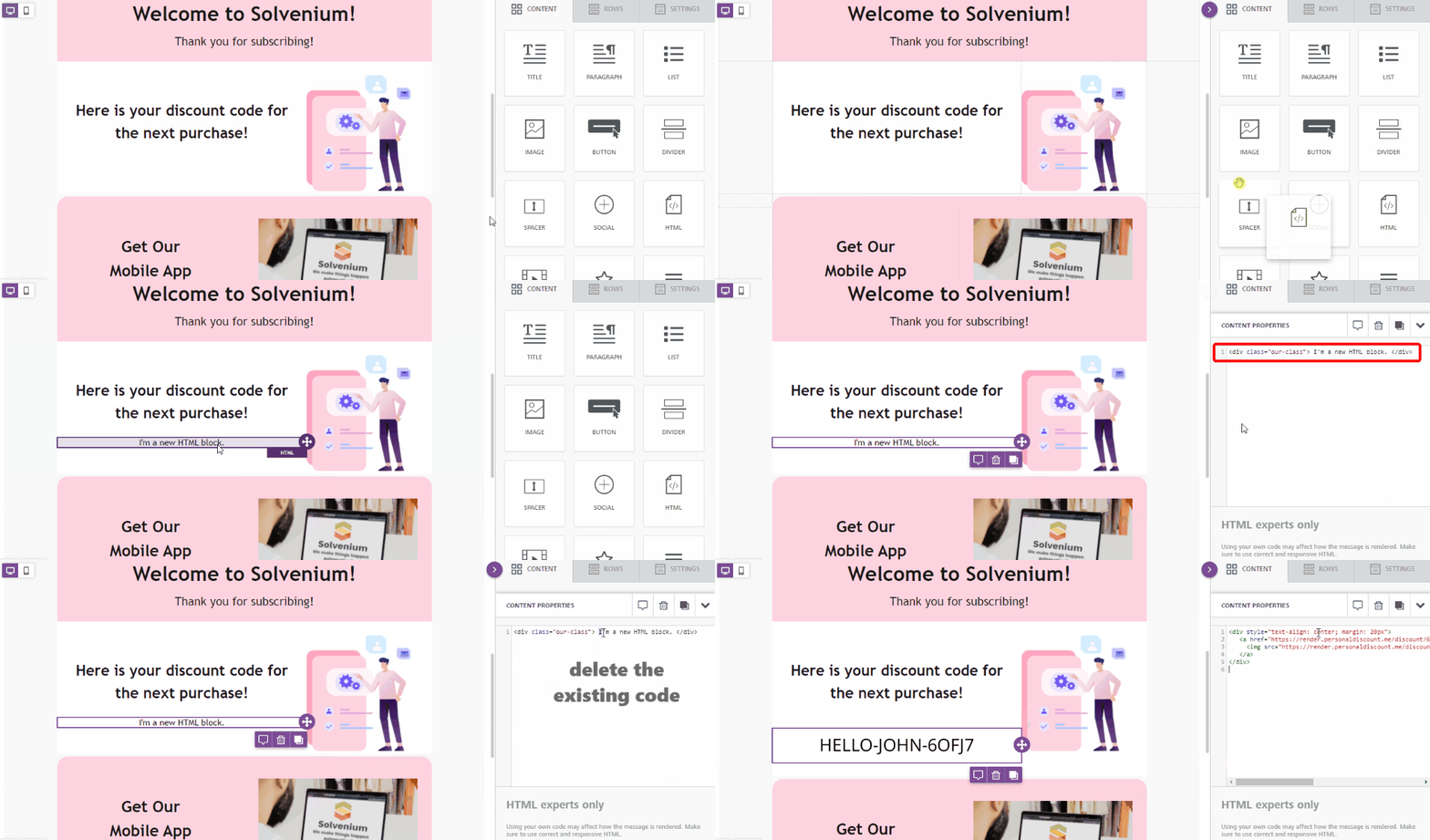
Below you can see, how to add the Discounteo code snippet to your email template.

<figure><img src="https://3731721370-files.gitbook.io/~/files/v0/b/gitbook-x-prod.appspot.com/o/spaces%2F-LZdVZovthV0SPlgxS6Y%2Fuploads%2FhqHSJDQqy1PtKmoWh30z%2Fbee-pro-personal-discount-code-snippet-shopify-animated.gif?alt=media&amp;token=32c2d682-66e6-4297-8686-504daba3daeb" alt="How to add an HTML element to an email template in BEE Pro"><figcaption><p>Add an HTML element to your BEE Pro email template</p></figcaption></figure>

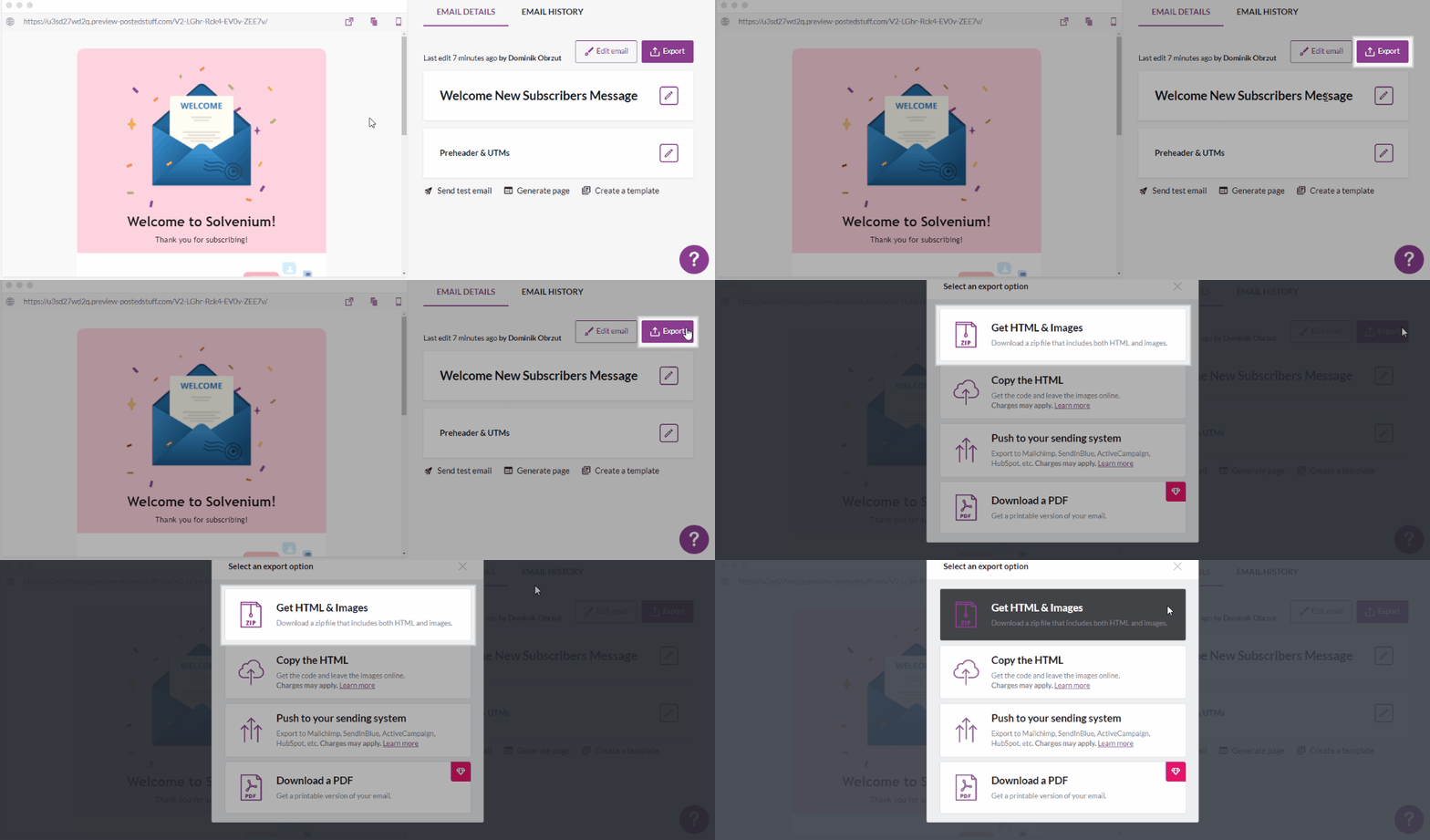
Now export the template as an HTML doc.&#x20;

<figure><img src="https://3731721370-files.gitbook.io/~/files/v0/b/gitbook-x-prod.appspot.com/o/spaces%2F-LZdVZovthV0SPlgxS6Y%2Fuploads%2Fcz1qL7chFPAS5QkkO7zK%2Fbee-pro-personal-export-html-code-email-message-animated.gif?alt=media&amp;token=f84399e4-1366-4e25-a805-5fd3cbec1a96" alt="BEE Pro: How to export an HTML email"><figcaption><p>Add an HTML element to your email template</p></figcaption></figure>

Switch over to your **Campaign Monitor dashboard**. Navigate to **Automations** and hit **Create an automation** button. Select **Welcome journey**. In the next step make sure that you have selected a subscribers list that is connected with your Shopify store. Click **Continue**.&#x20;

<figure><img src="https://3731721370-files.gitbook.io/~/files/v0/b/gitbook-x-prod.appspot.com/o/spaces%2F-LZdVZovthV0SPlgxS6Y%2Fuploads%2FW1u7csJoQhPs23Rha1Y9%2Fcampaignmonitor-create-welcome-new-subscribers-automation-animated.gif?alt=media&amp;token=08623fb3-3519-45ae-9868-9539f87ae610" alt="Create a welcome automation in Campaign Monitor"><figcaption><p>Create a welcome automation</p></figcaption></figure>

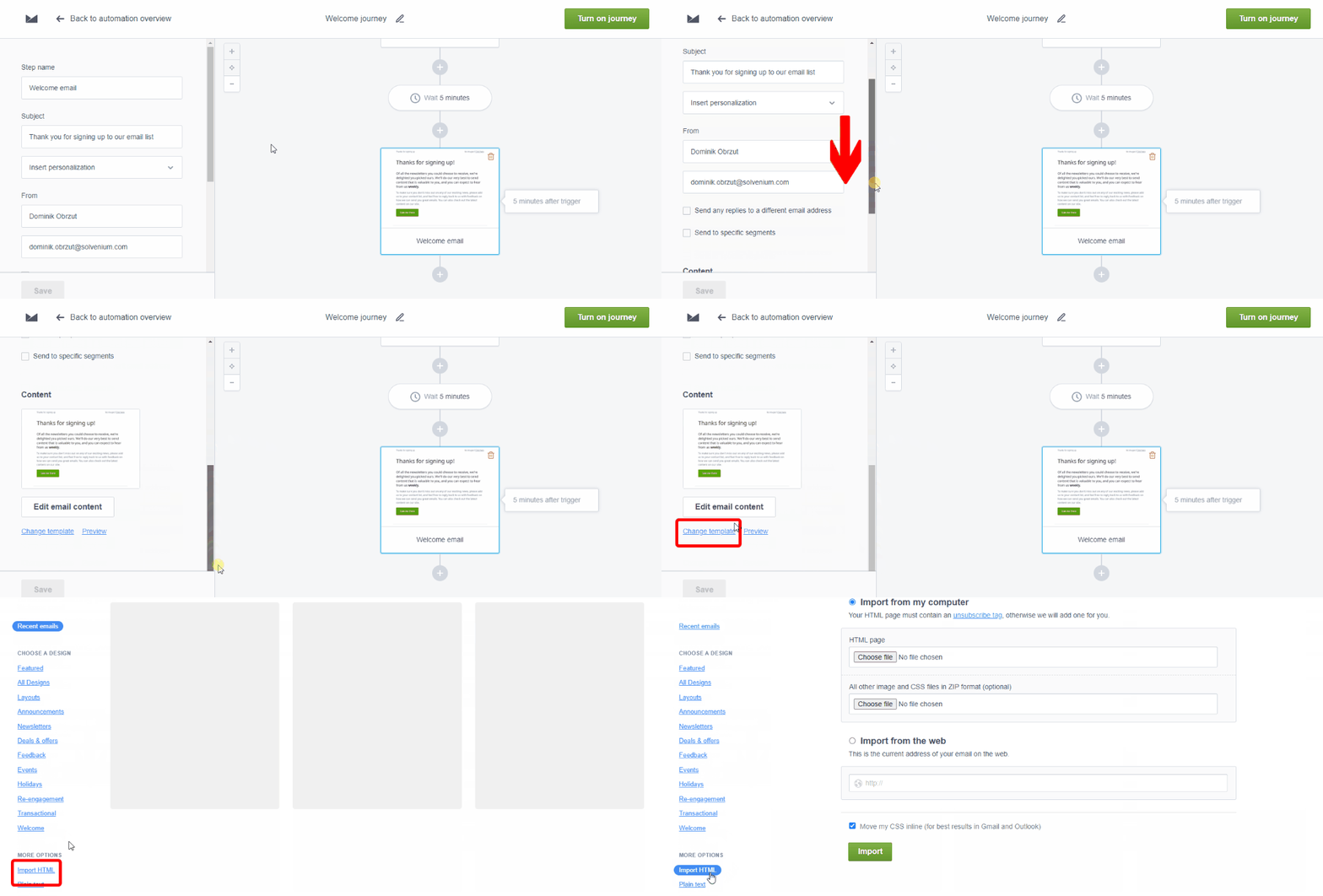
Now import your email template to the automation. Scroll down the left section and click **Change template**, next **Import HTML** at the bottom.

<figure><img src="https://3731721370-files.gitbook.io/~/files/v0/b/gitbook-x-prod.appspot.com/o/spaces%2F-LZdVZovthV0SPlgxS6Y%2Fuploads%2F7jklXtE98jorRcTVvaUr%2Fcampaignmonitor-import-html-template-animated.gif?alt=media&amp;token=fb9bdcc2-9b00-48f1-892c-70a0b8831f9e" alt="Import an HTML email template into Campaign Monitor"><figcaption><p>Import an email HTML template into Campaign Monitor</p></figcaption></figure>

It's high time we activated our automation.&#x20;

<figure><img src="https://3731721370-files.gitbook.io/~/files/v0/b/gitbook-x-prod.appspot.com/o/spaces%2F-LZdVZovthV0SPlgxS6Y%2Fuploads%2FSgbDtsXgmBoi4vCWBvNa%2Fcampaignmonitor-turn-on-welcome-automation-animated.gif?alt=media&amp;token=8194a691-9b19-4db2-886c-eb1731b628e5" alt="How to activate a Campaign Monitor welcome automation"><figcaption><p>Activate the Campaign Monitor welcome automation</p></figcaption></figure>

When your customer joins the newsletter, they will receive an email with a discount code.

<figure><img src="https://3731721370-files.gitbook.io/~/files/v0/b/gitbook-x-prod.appspot.com/o/spaces%2F-LZdVZovthV0SPlgxS6Y%2Fuploads%2F3hODpRRpnmX8Fulat1OE%2Fcampaignmonitor-welcome-email-shopify-personal-discount-code.png?alt=media&amp;token=91affd47-a483-464c-9262-34792cf1f1ee" alt="Welcome new subscribers email with a Shopify discount code"><figcaption><p>Welcome email with a Discounteo discount code</p></figcaption></figure>