> For the complete documentation index, see [llms.txt](https://docs.personaldiscount.io/llms.txt). Markdown versions of documentation pages are available by appending `.md` to page URLs; this page is available as [Markdown](https://docs.personaldiscount.io/discounteo-for-shopify/integrate-discounteo-with-your-email-service-provider/aweber/reward-new-subscribers-with-a-discount-code-using-aweber.md).

# Reward new subscribers with a discount code using AWeber

A newsletter is a great tool to stay in touch with your customers. To encourage them to subscribe, give a discount code for the next purchase. Learn how to do it with Discounteo and AWeber.

Navigate to your **Shopify dashboard** > **Apps** > **Discounteo**. Hit the **Add automation** button, select **AWeber** as your Email Service Provider, and **Welcome New Subscribers** a Campaign type.

<figure><img src="https://3731721370-files.gitbook.io/~/files/v0/b/gitbook-x-prod.appspot.com/o/spaces%2F-LZdVZovthV0SPlgxS6Y%2Fuploads%2FXkLQ76BWCJm3XZnOEISD%2Fpersonal-discount-code-shopify-aweber-welcome-new-subscribers.gif?alt=media&amp;token=127673af-8510-46c6-9b22-99ecded96c9a" alt="Discounteo for Shopify: Create an automation with AWeber"><figcaption><p>Create Discounteo automation for AWeber</p></figcaption></figure>

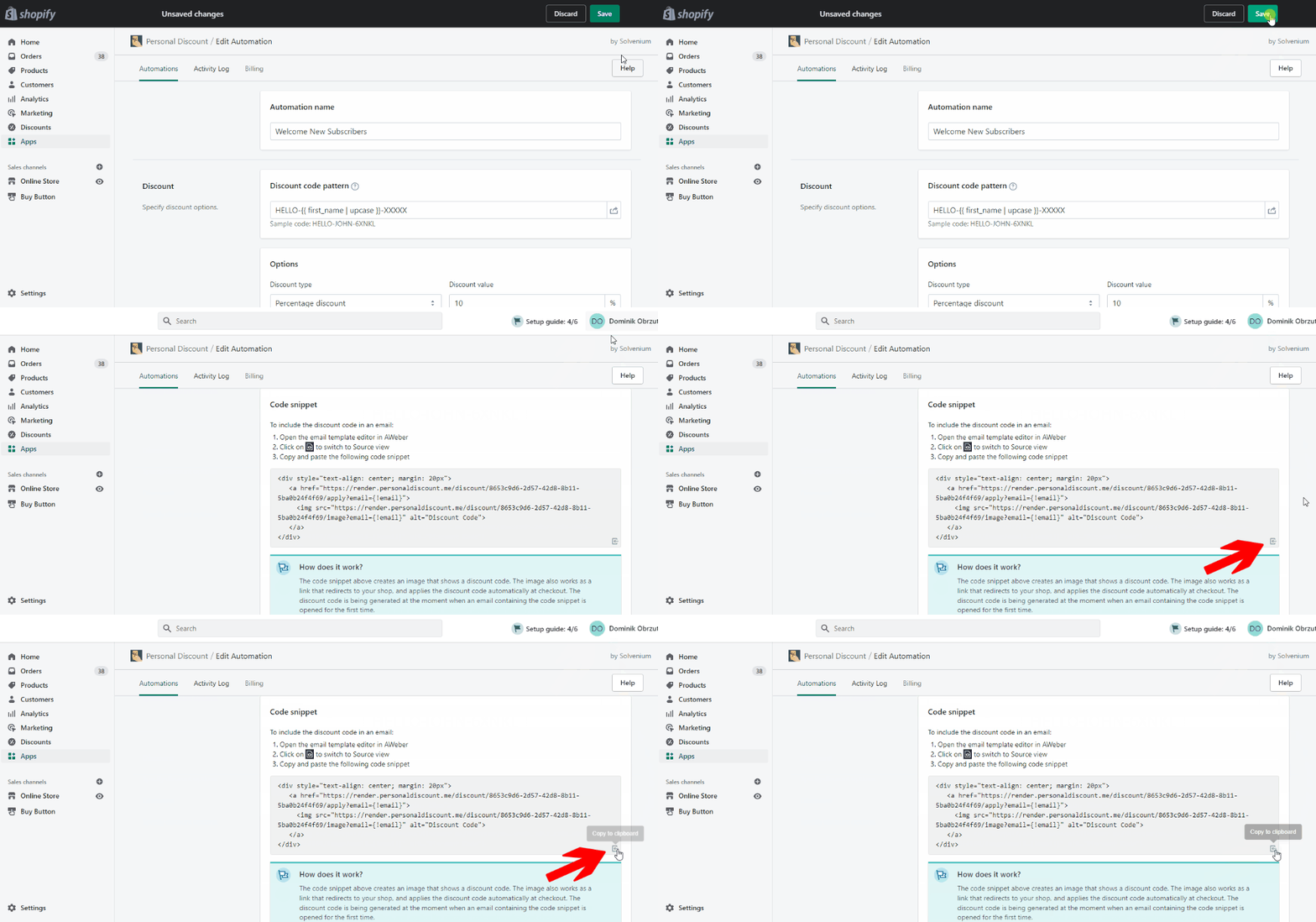
Specify your automation details like the discount pattern, value, expiration date, or usage limit. Here is a great guide on [how to configure discount in your Shopify store using the Discounteo app.](/discounteo-for-shopify/configure-discount.md)

When your automation is finished, click the **Save** button and copy the code snippet to the clipboard.&#x20;

<figure><img src="https://3731721370-files.gitbook.io/~/files/v0/b/gitbook-x-prod.appspot.com/o/spaces%2F-LZdVZovthV0SPlgxS6Y%2Fuploads%2FZF7NMgs7fhwvaNJlUb8c%2Fpersonal-discount-code-shopify-aweber-welcome-new-subscribers-copy-code-snippet.gif?alt=media&amp;token=8035563b-1daa-4ad4-b444-b2f59b69d0c5" alt="Copy the Discounteo code snippet to the clipboard"><figcaption><p>Copy the Discounteo code snippet to your clipboard</p></figcaption></figure>

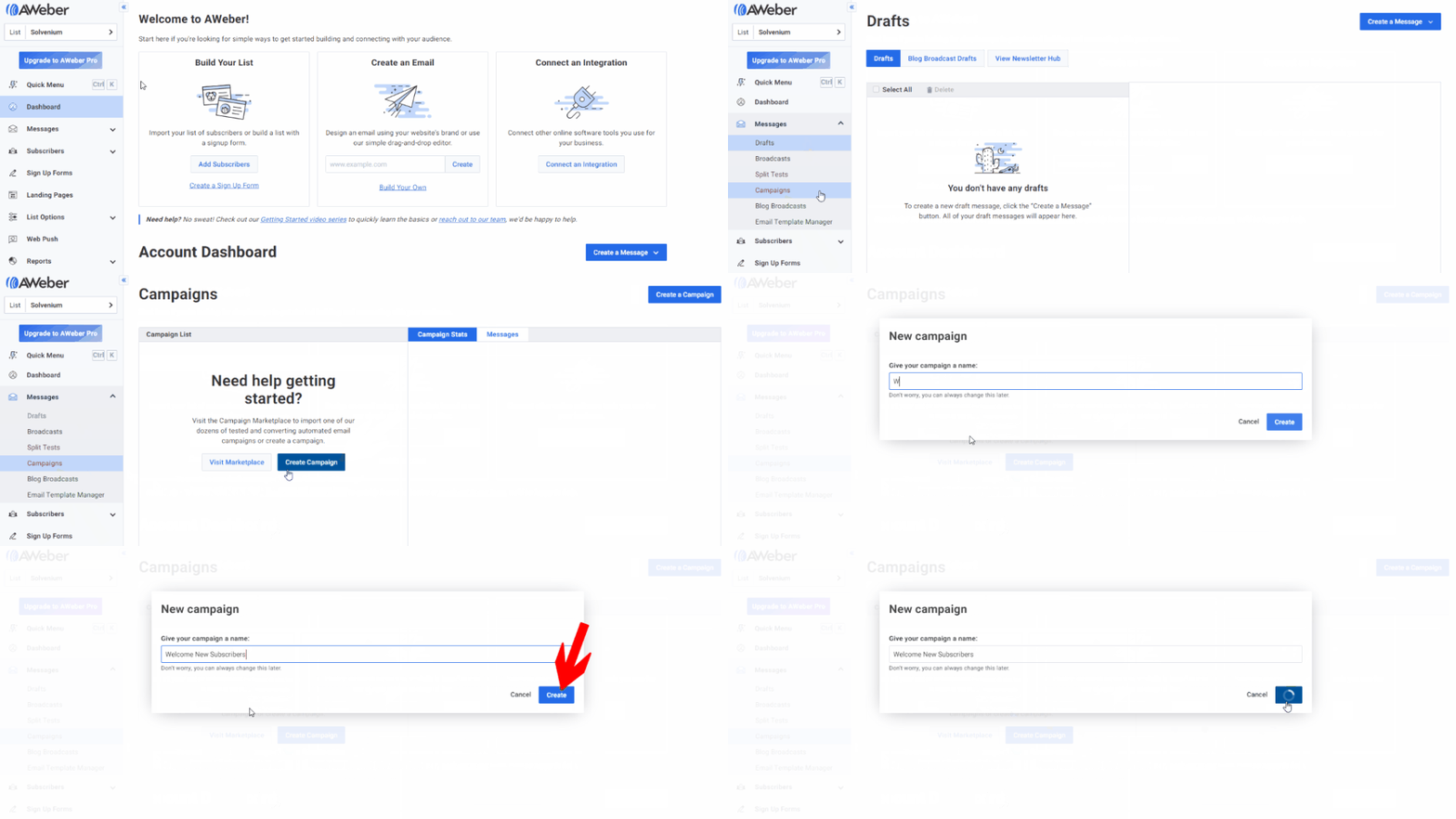
Now switch over to your AWeber admin panel. Click **Messages** > **Campaigns** > **Create Campaign**. Then **Blank Campaign,** enter their name, and hit **Create**.

<figure><img src="https://3731721370-files.gitbook.io/~/files/v0/b/gitbook-x-prod.appspot.com/o/spaces%2F-LZdVZovthV0SPlgxS6Y%2Fuploads%2Fc9G2K8AG3D8HroEDKoq6%2Fpersonal-discount-code-shopify-aweber-welcome-new-subscribers-campaign-builder.gif?alt=media&amp;token=71165f2e-3059-4c13-9daa-9e1dfaf5a923" alt="Create an AWeber welcome campaign for new subscribers"><figcaption><p>Create an AWeber welcome campaign for new subscribers</p></figcaption></figure>

In the next step select the **On Subscribe** trigger. Drag and drop the **Send a Message** box to your automation and click **Create a Message**. We will do it using **Drag and Drop Email Builder**.

<figure><img src="https://3731721370-files.gitbook.io/~/files/v0/b/gitbook-x-prod.appspot.com/o/spaces%2F-LZdVZovthV0SPlgxS6Y%2Fuploads%2F9aFvmR7RXkRfp7WaMpWa%2Fpersonal-discount-code-shopify-aweber-welcome-new-subscribers-campaign-set-trigger-send-email.gif?alt=media&amp;token=476f5423-cd20-4a0c-9216-9628cbf9cdab" alt="How to build an AWeber welcome automation for new subscribers"><figcaption><p>Build an AWeber welcome automation for new subscribers</p></figcaption></figure>

Now design your message. To insert the code snippet drag and drop a **Paragraph** element, switch over to the **Source** view and paste the snippet from Discounteo. Then hit **OK**. Click **Save & Exit** at the right bottom when your template is ready.

<figure><img src="https://3731721370-files.gitbook.io/~/files/v0/b/gitbook-x-prod.appspot.com/o/spaces%2F-LZdVZovthV0SPlgxS6Y%2Fuploads%2FUdqsqwgvDUEmJIlE14JX%2Fpersonal-discount-code-shopify-aweber-welcome-new-subscribers-campaign-design-template.gif?alt=media&amp;token=0dfcd4ec-ab4a-47c7-842f-ead3f26a5995" alt="AWeber: Create a welcome email template"><figcaption><p>AWeber: Create a welcome email template for new subscribers</p></figcaption></figure>

Next, save your entire automation and activate it.&#x20;

<figure><img src="https://3731721370-files.gitbook.io/~/files/v0/b/gitbook-x-prod.appspot.com/o/spaces%2F-LZdVZovthV0SPlgxS6Y%2Fuploads%2FHuL1hxD6jjbbQ9dmfRel%2Fpersonal-discount-code-shopify-aweber-welcome-new-subscribers-activate-campaign.gif?alt=media&amp;token=9095fc7c-4a6e-410f-a96c-ac283829e68b" alt="How to activate an AWeber automation"><figcaption><p>Activate an AWeber welcome automation</p></figcaption></figure>

That's all! From now you can reward new subscribers with a discount code.

<figure><img src="https://3731721370-files.gitbook.io/~/files/v0/b/gitbook-x-prod.appspot.com/o/spaces%2F-LZdVZovthV0SPlgxS6Y%2Fuploads%2FrqhvKdFXBgT0UhKWKzxV%2Fwelcome-new-subscribers-aweber-shopify-personal-discount-code.png?alt=media&amp;token=6235239f-9642-4fd9-b1a9-dfa124a169b8" alt="AWeber welcome email with a discount code"><figcaption><p>AWeber welcome email with a discount code</p></figcaption></figure>